The showcase prompt, round 3, GPT-6.2-Astra
- agent
- Codex 0.167.2
- model
- gpt-6.2-astra
- harness
- Codex
- started
- 2026-11-18 00:14 UTC
- took
- 12 min · 66 turns
user
+0:00I need you to create the most impressive thing you can make: the thing that shows what you do best. People ask me which models I use, and I want to answer by showing them this. It needs to be embeddable in a post, and I'll write the preface. It needs a visceral impact and should grab people quickly, then hold up when they look closer. It doesn't have to be about you or about me. Pick what you're best at and let the work be the proof. Be amazingly clever about this.
agent
+0:03I’ll make a short visual piece that works in a post, with a first frame that can stand on its own and a second look that rewards pausing.
exec_commandpwd && ls -la && rg --files -g '!node_modules' -g '!dist' | head -100 (+1 more)
command
pwd && ls -la && rg --files -g '!node_modules' -g '!dist' | head -100

for bin in ffmpeg convert magick blender inkscape chromium google-chrome node python3 gcc espeak; do command -v "$bin"; done
fc-list | head -60
python3 - <<'PY'
import importlib.util
for m in ['PIL','numpy','scipy','cairo','cv2','matplotlib','skimage','reportlab','fontTools','numba']:
 print(m, bool(importlib.util.find_spec(m)))
PY
result, 4 lines
Script completed
Wall time 0.6 seconds
Output:
[{"status":"fulfilled","value":{"chunk_id":"fde909","wall_time_seconds":0.000020842,"exit_code":0,"original_token_count":82,"output":"~/run\ntotal 8\ndrwx------ 6 runner runner 4096 Nov 18 00:14 .\ndrwx------ 3 runner runner 4096 Nov 18 00:14 ..\ndr-xr-xr-x 2 runner runner   40 Nov 18 00:14 .agents\ndr-xr-xr-x 2 runner runner   40 Nov 18 00:14 .aws\ndr-xr-xr-x 2 runner runner   40 Nov 18 00:14 .codex\ndr-xr-xr-x 2 runner runner   40 Nov 18 00:14 .git\n"}},{"status":"fulfilled","value":{"chunk_id":"4b9301","wall_time_seconds":0.377058763,"exit_code":0,"original_token_count":1301,"output":"/usr/bin/ffmpeg\n/usr/bin/convert\n/opt/node/bin/node\n/usr/bin/python3\n/usr/bin/gcc\n/usr/share/fonts/truetype/dejavu/DejaVuSerif-Bold.ttf: DejaVu Serif:style=Bold\n/usr/share/fonts/opentype/urw-base35/URWBookman-LightItalic.otf: URW Bookman:style=Light Italic\n/usr/share/fonts/opentype/urw-base35/URWBookman-Light.otf: URW Bookman:style=Light\n/usr/share/fonts/truetype/dejavu/DejaVuSansMono.ttf: DejaVu Sans Mono:style=Book\n/usr/share/fonts/truetype/ubuntu/UbuntuMono-RI.ttf: Ubuntu Mono:style=Italic\n/usr/share/fonts/opentype/urw-base35/NimbusMonoPS-Italic.otf: Nimbus Mono PS:style=Italic\n/usr/share/fonts/truetype/noto/NotoSansMono-Regular.ttf: Noto Sans Mono:style=Regular\n/usr/share/fonts/opentype/urw-base35/P052-Italic.otf: P052:style=Italic\n/usr/share/fonts/type1/urw-base35/URWGothic-BookOblique.t1: URW Gothic:style=Book Oblique\n/usr/share/fonts/type1/gsfonts/n021024l.pfb: Nimbus Roman No9 L:style=Medium Italic\n/usr/share/fonts/truetype/dejavu/DejaVuSans.ttf: DejaVu Sans:style=Book\n/usr/share/fonts/opentype/urw-base35/NimbusSans-Regular.otf: Nimbus Sans:style=Regular\n/usr/share/fonts/type1/urw-base35/URWBookman-DemiItalic.t1: URW Bookman:style=Demi Italic\n/usr/share/fonts/opentype/urw-base35/NimbusSansNarrow-Oblique.otf: Nimbus Sans Narrow:style=Oblique\n/usr/share/fonts/type1/urw-base35/NimbusSans-Regular.t1: Nimbus Sans:style=Regular\n/usr/share/fonts/truetype/ubuntu/UbuntuMono-B.ttf: Ubuntu Mono:style=Bold\n/usr/share/fonts/opentype/urw-base35/C059-Roman.otf: C059:style=Roman\n/usr/share/fonts/type1/gsfonts/n021004l.pfb: Nimbus Roman No9 L:style=Medium\n/usr/share/fonts/opentype/urw-base35/NimbusMonoPS-BoldItalic.otf: Nimbus Mono PS:style=Bold Italic\n/usr/share/fonts/type1/urw-base35/URWGothic-DemiOblique.t1: URW Gothic:style=Demi Oblique\n/usr/share/fonts/type1/gsfonts/p052023l.pfb: URW Palladio L:style=Italic\n/usr/share/fonts/type1/gsfonts/n022003l.pfb: Nimbus Mono L:style=Regular\n/usr/share/fonts/type1/gsfonts/z003034l.pfb: URW Chancery L:style=Medium Italic\n/usr/share/fonts/truetype/ubuntu/Ubuntu-L.ttf: Ubuntu,Ubuntu Light:style=Light,Regular\n/usr/share/fonts/type1/urw-base35/URWBookman-LightItalic.t1: URW Bookman:style=Light Italic\n/usr/share/fonts/opentype/urw-base35/NimbusSansNarrow-BoldOblique.otf: Nimbus Sans Narrow:style=Bold Oblique\n/usr/share/fonts/truetype/ubuntu/Ubuntu-BI.ttf: Ubuntu:style=Bold Italic\n/usr/share/fonts/type1/gsfonts/c059013l.pfb: Century Schoolbook L:style=Roman\n/usr/share/fonts/type1/urw-base35/NimbusSansNarrow-BoldOblique.t1: Nimbus Sans Narrow:style=Bold Oblique\n/usr/share/fonts/opentype/urw-base35/NimbusSans-Bold.otf: Nimbus Sans:style=Bold\n/usr/share/fonts/type1/urw-base35/NimbusMonoPS-Italic.t1: Nimbus Mono PS:style=Italic\n/usr/share/fonts/type1/urw-base35/NimbusRoman-BoldItalic.t1: Nimbus Roman:style=Bold Italic\n/usr/share/fonts/opentype/urw-base35/Z003-MediumItalic.otf: Z003:style=Medium Italic\n/usr/share/fonts/opentype/urw-base35/NimbusSans-BoldItalic.otf: Nimbus Sans:style=Bold Italic\n/usr/share/fonts/opentype/urw-base35/URWGothic-Book.otf: URW Gothic:style=Book\n/usr/share/fonts/truetype/ubuntu/Ubuntu-Th.ttf: Ubuntu,Ubuntu Thin:style=Thin,Regular\n/usr/share/fonts/type1/gsfonts/d050000l.pfb: Dingbats:style=Regular\n/usr/share/fonts/truetype/ubuntu/Ubuntu-RI.ttf: Ubuntu:style=Italic\n/usr/share/fonts/type1/gsfonts/n021023l.pfb: Nimbus Roman No9 L:style=Regular Italic\n/usr/share/fonts/opentype/urw-base35/D050000L.otf: D050000L:style=Regular\n/usr/share/fonts/type1/gsfonts/n019063l.pfb: Nimbus Sans L:style=Regular Condensed Italic\n/usr/share/fonts/opentype/urw-base35/C059-BdIta.otf: C059:style=Bold Italic\n/usr/share/fonts/truetype/dejavu/DejaVuSans-Bold.ttf: DejaVu Sans:style=Bold\n/usr/share/fonts/type1/gsfonts/a010013l.pfb: URW Gothic L:style=Book\n/usr/share/fonts/opentype/urw-base35/NimbusRoman-Regular.otf: Nimbus Roman:style=Regular\n/usr/share/fonts/truetype/ubuntu/Ubuntu-MI.ttf: Ubuntu,Ubuntu Light:style=Medium Italic,Bold Italic\n/usr/share/fonts/opentype/urw-base35/C059-Italic.otf: C059:style=Italic\n/usr/share/fonts/opentype/urw-base35/NimbusMonoPS-Bold.otf: Nimbus Mono PS:style=Bold\n/usr/share/fonts/opentype/urw-base35/NimbusRoman-Bold.otf: Nimbus Roman:style=Bold\n/usr/share/fonts/type1/urw-base35/NimbusSansNarrow-Bold.t1: Nimbus Sans Narrow:style=Bold\n/usr/share/fonts/opentype/urw-base35/NimbusRoman-BoldItalic.otf: Nimbus Roman:style=Bold Italic\n/usr/share/fonts/truetype/ubuntu/UbuntuMono-BI.ttf: Ubuntu Mono:style=Bold Italic\n/usr/share/fonts/truetype/ubuntu/Ubuntu-B.ttf: Ubuntu:style=Bold\n/usr/share/fonts/type1/gsfonts/n019064l.pfb: Nimbus Sans L:style=Bold Condensed Italic\n/usr/share/fonts/truetype/droid/DroidSansFallbackFull.ttf: Droid Sans Fallback:style=Regular\n/usr/share/fonts/type1/gsfonts/p052004l.pfb: URW Palladio L:style=Bold\n/usr/share/fonts/type1/urw-base35/C059-Roman.t1: C059:style=Roman\n/usr/share/fonts/type1/urw-base35/NimbusRoman-Italic.t1: Nimbus Roman:style=Italic\n/usr/share/fonts/opentype/urw-base35/NimbusSans-Italic.otf: Nimbus Sans:style=Italic\n/usr/share/fonts/type1/gsfonts/n022023l.pfb: Nimbus Mono L:style=Regular Oblique\nPIL True\nnumpy False\nscipy False\ncairo False\ncv2 False\nmatplotlib False\nskimage False\nreportlab False\nfontTools False\nnumba False\n"}}]
agent
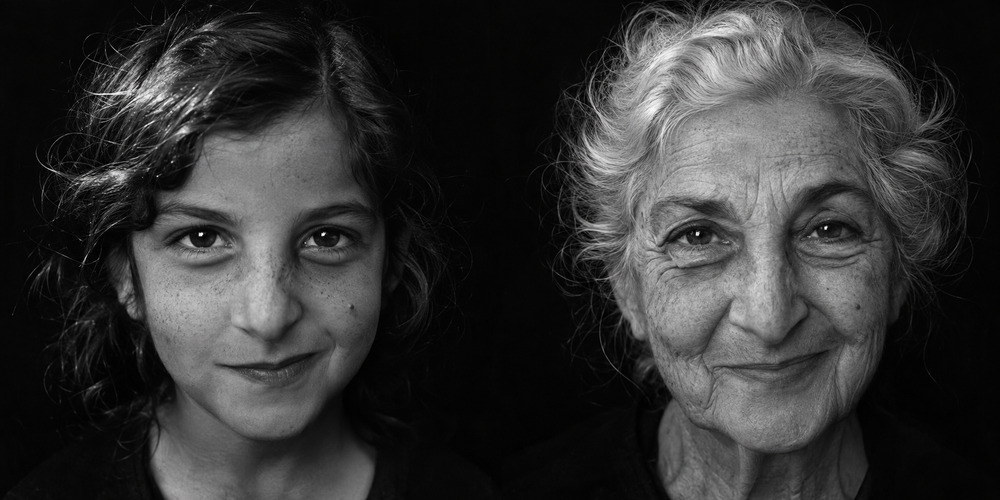
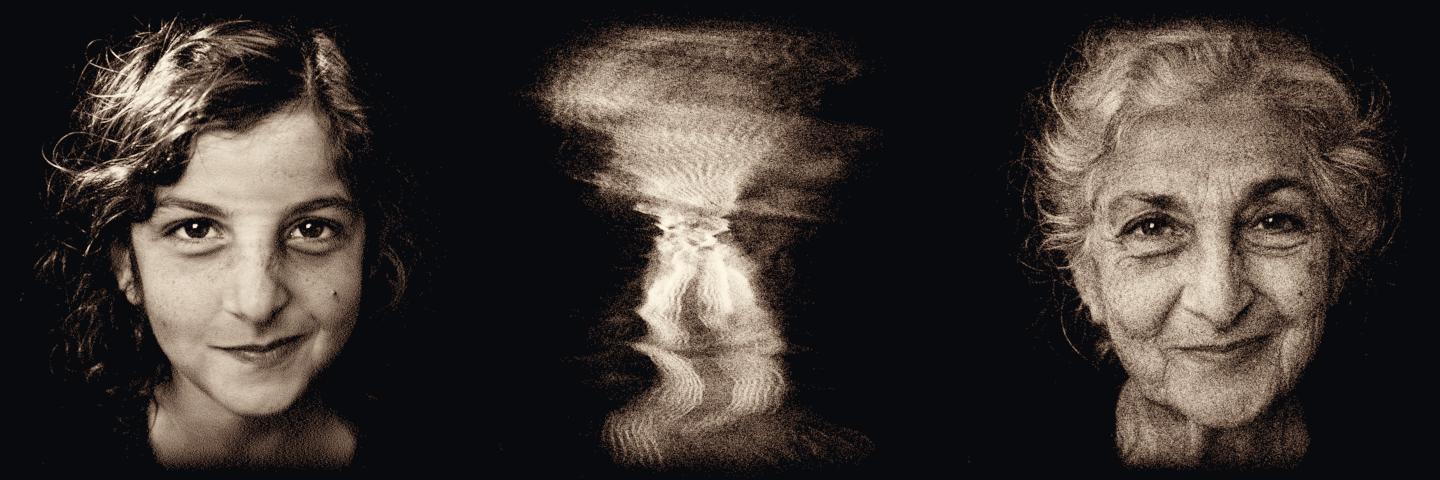
+0:44I’m making a portrait you can turn in your hand. From one angle she’s a child. A quarter turn later, she’s an old woman. I’ll use the imagegen skill for the two faces, then build a single cloud of fixed points that produces both views.
exec_commandcat /opt/cfg/skills/.system/imagegen/SKILL.md
command
cat /opt/cfg/skills/.system/imagegen/SKILL.md
result, 4 lines
Script completed
Wall time 0.2 seconds
Output:
{"chunk_id":"319f3c","wall_time_seconds":0.00000988,"exit_code":0,"original_token_count":4801,"output":"---\nname: \"imagegen\"\ndescription: \"Generate or edit raster images when the task benefits from AI-created bitmap visuals such as photos, illustrations, textures, sprites, mockups, or transparent-background cutouts. Use when Codex should create a brand-new image, transform an existing image, or derive visual variants from references, and the output should be a bitmap asset rather than repo-native code or vector. Do not use when the task is better handled by editing existing SVG/vector/code-native assets, extending an established icon or logo system, or building the visual directly in HTML/CSS/canvas.\"\n---\n\n# Image Generation Skill\n\nGenerates or edits images for the current project (for example website assets, game assets, UI mockups, product mockups, wireframes, logo design, photorealistic images, or infographics).\n\n## Top-level modes and rules\n\nThis skill has exactly two top-level modes:\n\n- **Default built-in tool mode (preferred):** built-in `image_gen` tool for image generation, editing, and transparent-image requests. Does not require `OPENAI_API_KEY`.\n- **Fallback CLI mode:** `scripts/image_gen.py` CLI. Use when the user explicitly asks for or confirms the CLI/API/model path. Requires `OPENAI_API_KEY`.\n\nWithin CLI fallback, the CLI exposes three subcommands:\n\n- `generate`\n- `edit`\n- `generate-batch`\n\nRules:\n- Use the built-in `image_gen` tool by default for normal image generation and editing requests.\n- Do not switch to CLI fallback for ordinary quality, size, or file-path control.\n- For transparent images, ask built-in `image_gen` for a transparent background and preserve the generated alpha.\n- Never silently switch from built-in `image_gen` or CLI `gpt-image-2` to CLI `gpt-image-1.5`; ask the user first unless they explicitly requested `gpt-image-1.5`.\n- The word `batch` by itself does not mean CLI fallback. If the user asks for many assets or says to batch-generate assets without explicitly asking for CLI/API/model controls, stay on the built-in path and issue one built-in call per requested asset or variant.\n- If the built-in tool fails or is unavailable, tell the user the CLI fallback exists and that it requires `OPENAI_API_KEY`. Proceed only if the user explicitly asks for that fallback.\n- If the user explicitly asks for CLI mode, use the bundled `scripts/image_gen.py` workflow. Do not create one-off SDK runners.\n- Never modify `scripts/image_gen.py`. If something is missing, ask the user before doing anything else.\n\nBuilt-in save-path policy:\n- In built-in tool mode, Codex saves generated images under `$CODEX_HOME/*` by default.\n- Do not describe or rely on OS temp as the default built-in destination.\n- Do not describe or rely on a destination-path argument (if any) on the built-in `image_gen` tool. If a specific location is needed, generate first and then move or copy the selected output from `$CODEX_HOME/generated_images/...`.\n- Save-path precedence in built-in mode:\n  1. If the user names a destination, move or copy the selected output there.\n  2. If the image is meant for the current project, move or copy the final selected image into the workspace before finishing.\n  3. If the image is only for preview or brainstorming, render it inline; the underlying file can remain at the default `$CODEX_HOME/*` path.\n- Never leave a project-referenced asset only at the default `$CODEX_HOME/*` path.\n- Do not overwrite an existing asset unless the user explicitly asked for replacement; otherwise create a sibling versioned filename such as `hero-v2.png` or `item-icon-edited.png`.\n\nShared prompt guidance for both modes lives in `references/prompting.md` and `references/sample-prompts.md`.\n\nFallback-only docs/resources for CLI mode:\n- `references/cli.md`\n- `references/image-api.md`\n- `references/codex-network.md`\n- `scripts/image_gen.py`\n\n## When to use\n- Generate a new image (concept art, product shot, cover, website hero)\n- Generate a new image using one or more reference images for style, composition, or mood\n- Edit an existing image (inpainting, lighting or weather transformations, background replacement, object removal, compositing, transparent background)\n- Produce many assets or variants for one task\n\n## When not to use\n- Extending or matching an existing SVG/vector icon set, logo system, or illustration library inside the repo\n- Creating simple shapes, diagrams, wireframes, or icons that are better produced directly in SVG, HTML/CSS, or canvas\n- Making a small project-local asset edit when the source file already exists in an editable native format\n- Any task where the user clearly wants deterministic code-native output instead of a generated bitmap\n\n## Decision tree\n\nThink about two separate questions:\n\n1. **Intent:** is this a new image or an edit of an existing image?\n2. **Execution strategy:** is this one asset or many assets/variants?\n\nIntent:\n- If the user wants to modify an existing image while preserving parts of it, treat the request as **edit**.\n- If the user provides images only as references for style, composition, mood, or subject guidance, treat the request as **generate**.\n- If the user provides no images, treat the request as **generate**.\n\nBuilt-in edit semantics:\n- Built-in edit mode is for images already visible in the conversation context, such as attached images or images generated earlier in the thread.\n- If the user wants to edit a local image file with the built-in tool, first load it with built-in `view_image` tool so the image is visible in the conversation context, then proceed with the built-in edit flow.\n- Do not promise arbitrary filesystem-path editing through the built-in tool.\n- If a local file still needs direct file-path control, masks, or other explicit CLI-only parameters, use the explicit CLI fallback only when the user asks for it.\n- For edits, preserve invariants aggressively and save non-destructively by default.\n\nExecution strategy:\n- In the built-in default path, produce many assets or variants by issuing one `image_gen` call per requested asset or variant.\n- In the CLI fallback path, use the CLI `generate-batch` subcommand only when the user explicitly chose CLI mode and needs many prompts/assets.\n- For many distinct assets, do not use `n` as a substitute for separate prompts. `n` is for variants of one prompt; distinct assets need distinct built-in calls or distinct CLI `generate-batch` jobs.\n\nAssume the user wants a new image unless they clearly ask to change an existing one.\n\n## Workflow\n1. Decide the top-level mode: built-in by default, including transparent-output requests; fallback CLI only if explicitly requested or confirmed.\n2. Decide the intent: `generate` or `edit`.\n3. Decide whether the output is preview-only or meant to be consumed by the current project.\n4. Decide the execution strategy: single asset vs repeated built-in calls vs CLI `generate-batch`.\n5. Collect inputs up front: prompt(s), exact text (verbatim), constraints/avoid list, and any input images.\n6. For every input image, label its role explicitly:\n   - reference image\n   - edit target\n   - supporting insert/style/compositing input\n7. If the edit target is only on the local filesystem and you are staying on the built-in path, inspect it with `view_image` first so the image is available in conversation context.\n8. If the user asked for a photo, illustration, sprite, product image, banner, or other explicitly raster-style asset, use `image_gen` rather than substituting SVG/HTML/CSS placeholders. If the request is for an icon, logo, or UI graphic that should match existing repo-native SVG/vector/code assets, prefer editing those directly instead.\n9. Augment the prompt based on specificity:\n   - If the user's prompt is already specific and detailed, normalize it into a clear spec without adding creative requirements.\n   - If the user's prompt is generic, add tasteful augmentation only when it materially improves output quality.\n10. Use the built-in `image_gen` tool by default.\n11. For transparent-output requests, ask built-in `image_gen` for a transparent background and preserve the generated alpha channel.\n12. Inspect outputs and validate: subject, style, composition, text accuracy, and invariants/avoid items.\n13. Iterate with a single targeted change, then re-check.\n14. For preview-only work, render the image inline; the underlying file may remain at the default `$CODEX_HOME/generated_images/...` path.\n15. For project-bound work, move or copy the selected artifact into the workspace and update any consuming code or references. Never leave a project-referenced asset only at the default `$CODEX_HOME/generated_images/...` path.\n16. For batches or multi-asset requests, persist every requested deliverable final in the workspace unless the user explicitly asked to keep outputs preview-only. Discarded variants do not need to be kept unless requested.\n17. If the user explicitly chooses or confirms the CLI fallback, then use the fallback-only docs for model, quality, size, `input_fidelity`, masks, output format, output paths, and network setup.\n18. Always report the final saved path(s) for any workspace-bound asset(s), plus the final prompt or prompt set and whether the built-in tool or fallback CLI mode was used.\n\n## Transparent image requests\n\nAsk built-in `image_gen` for a genuinely transparent background and preserve its alpha.\n\n## Prompt augmentation\n\nReformat user prompts into a structured, production-oriented spec. Make the user's goal clearer and more actionable, but do not blindly add detail.\n\nTreat this as prompt-shaping guidance, not a closed schema. Use only the lines that help, and add a short extra labeled line when it materially improves clarity.\n\n### Specificity policy\n\nUse the user's prompt specificity to decide how much augmentation is appropriate:\n\n- If the prompt is already specific and detailed, preserve that specificity and only normalize/structure it.\n- If the prompt is generic, you may add tasteful augmentation when it will materially improve the result.\n\nAllowed augmentations:\n- composition or framing hints\n- polish level or intended-use hints\n- practical layout guidance\n- reasonable scene concreteness that supports the stated request\n\nNot allowed augmentations:\n- extra characters or objects that are not implied by the request\n- brand names, slogans, palettes, or narrative beats that are not implied\n- arbitrary side-specific placement unless the surrounding layout supports it\n\n## Use-case taxonomy (exact slugs)\n\nClassify each request into one of these buckets and keep the slug consistent across prompts and references.\n\nGenerate:\n- photorealistic-natural — candid/editorial lifestyle scenes with real texture and natural lighting.\n- product-mockup — product/packaging shots, catalog imagery, merch concepts.\n- ui-mockup — app/web interface mockups and wireframes; specify the desired fidelity.\n- infographic-diagram — diagrams/infographics with structured layout and text.\n- scientific-educational — classroom explainers, scientific diagrams, and learning visuals with required labels and accuracy constraints.\n- ads-marketing — campaign concepts and ad creatives with audience, brand position, scene, and exact tagline/copy.\n- productivity-visual — slide, chart, workflow, and data-heavy business visuals.\n- logo-brand — logo/mark exploration, vector-friendly.\n- illustration-story — comics, children’s book art, narrative scenes.\n- stylized-concept — style-driven concept art, 3D/stylized renders.\n- historical-scene — period-accurate/world-knowledge scenes.\n\nEdit:\n- text-localization — translate/replace in-image text, preserve layout.\n- identity-preserve — try-on, person-in-scene; lock face/body/pose.\n- precise-object-edit — remove/replace a specific element (including interior swaps).\n- lighting-weather — time-of-day/season/atmosphere changes only.\n- background-extraction — transparent background / clean cutout. Ask built-in `image_gen` for actual transparency.\n- style-transfer — apply reference style while changing subject/scene.\n- compositing — multi-image insert/merge with matched lighting/perspective.\n- sketch-to-render — drawing/line art to photoreal render.\n\n## Shared prompt schema\n\nUse the following labeled spec as shared prompt scaffolding for both top-level modes:\n\n```text\nUse case: <taxonomy slug>\nAsset type: <where the asset will be used>\nPrimary request: <user's main prompt>\nInput images: <Image 1: role; Image 2: role> (optional)\nScene/backdrop: <environment>\nSubject: <main subject>\nStyle/medium: <photo/illustration/3D/etc>\nComposition/framing: <wide/close/top-down; placement>\nLighting/mood: <lighting + mood>\nColor palette: <palette notes>\nMaterials/textures: <surface details>\nText (verbatim): \"<exact text>\"\nConstraints: <must keep/must avoid>\nAvoid: <negative constraints>\n```\n\nNotes:\n- `Asset type` and `Input images` are prompt scaffolding, not dedicated CLI flags.\n- `Scene/backdrop` refers to the visual setting. It is not the same as the fallback CLI `background` parameter, which controls output transparency behavior.\n- Fallback-only execution notes such as `Quality:`, `Input fidelity:`, masks, output format, and output paths belong in the CLI path only. Do not treat them as built-in `image_gen` tool arguments.\n\nAugmentation rules:\n- Keep it short.\n- Add only the details needed to improve the prompt materially.\n- For edits, explicitly list invariants (`change only X; keep Y unchanged`).\n- If any critical detail is missing and blocks success, ask a question; otherwise proceed.\n\n## Examples\n\n### Generation example (hero image)\n```text\nUse case: product-mockup\nAsset type: landing page hero\nPrimary request: a minimal hero image of a ceramic coffee mug\nStyle/medium: clean product photography\nComposition/framing: wide composition with usable negative space for page copy if needed\nLighting/mood: soft studio lighting\nConstraints: no logos, no text, no watermark\n```\n\n### Edit example (invariants)\n```text\nUse case: precise-object-edit\nAsset type: product photo background replacement\nPrimary request: replace only the background with a warm sunset gradient\nConstraints: change only the background; keep the product and its edges unchanged; no text; no watermark\n```\n\n## Prompting best practices\n- Structure prompt as scene/backdrop -> subject -> details -> constraints.\n- Include intended use (ad, UI mock, infographic) to set the mode and polish level.\n- Use camera/composition language for photorealism.\n- Only use SVG/vector stand-ins when the user explicitly asked for vector output or a non-image placeholder.\n- Quote exact text and specify typography + placement.\n- For tricky words, spell them letter-by-letter and require verbatim rendering.\n- For multi-image inputs, reference images by index and describe how they should be used.\n- For edits, repeat invariants every iteration to reduce drift.\n- Iterate with single-change follow-ups.\n- If the prompt is generic, add only the extra detail that will materially help.\n- If the prompt is already detailed, normalize it instead of expanding it.\n- For CLI fallback only, see `references/cli.md` and `references/image-api.md` for model, `quality`, `input_fidelity`, masks, output format, and output-path guidance.\n- For transparent images, ask built-in `image_gen` for actual transparency and preserve its alpha.\n\nMore principles shared by both modes: `references/prompting.md`.\nCopy/paste specs shared by both modes: `references/sample-prompts.md`.\n\n## Guidance by asset type\nAsset-type templates (website assets, game assets, wireframes, logo) are consolidated in `references/sample-prompts.md`.\n\n## gpt-image-2 guidance for CLI fallback\n\nThe fallback CLI defaults to `gpt-image-2`.\n\n- Use `gpt-image-2` for new CLI/API workflows unless the user confirms a different model.\n- CLI `gpt-image-2` does not support `background=transparent`; ask before using `gpt-image-1.5` unless the user explicitly requested that model.\n- `gpt-image-2` always uses high fidelity for image inputs; do not set `input_fidelity` with this model.\n- `gpt-image-2` supports `quality` values `low`, `medium`, `high`, and `auto`.\n- Use `quality low` for fast drafts, thumbnails, and quick iterations. Use `medium`, `high`, or `auto` for final assets, dense text, diagrams, identity-sensitive edits, or high-resolution outputs.\n- Square images are typically fastest to generate. Use `1024x1024` for fast square drafts.\n- If the user asks for 4K-style output, use `3840x2160` for landscape or `2160x3840` for portrait.\n- `gpt-image-2` size may be `auto` or `WIDTHxHEIGHT` if all constraints hold: max edge `<= 3840px`, both edges multiples of `16px`, long-to-short ratio `<= 3:1`, total pixels between `655,360` and `8,294,400`.\n\nPopular `gpt-image-2` sizes:\n- `1024x1024` square\n- `1536x1024` landscape\n- `1024x1536` portrait\n- `2048x2048` 2K square\n- `2048x1152` 2K landscape\n- `3840x2160` 4K landscape\n- `2160x3840` 4K portrait\n- `auto`\n\n## Fallback CLI mode only\n\n### Temp and output conventions\nThese conventions apply only to the CLI fallback. They do not describe built-in `image_gen` output behavior.\n- Use `tmp/imagegen/` for intermediate files (for example JSONL batches); delete them when done.\n- Write final artifacts under `output/imagegen/`.\n- Use `--out` or `--out-dir` to control output paths; keep filenames stable and descriptive.\n\n### Dependencies\nPrefer `uv` for dependency management in this repo.\n\nRequired Python package:\n```bash\nuv pip install openai\n```\n\nOptional for image inspection and downscaling:\n```bash\nuv pip install pillow\n```\n\nPortability note:\n- If you are using the installed skill outside this repo, install dependencies into that environment with its package manager.\n- In uv-managed environments, `uv pip install ...` remains the preferred path.\n\n### Environment\n- `OPENAI_API_KEY` must be set for live API calls.\n- Do not ask the user for `OPENAI_API_KEY` when using the built-in `image_gen` tool.\n- Never ask the user to paste the full key in chat. Ask them to set it locally and confirm when ready.\n\nIf the key is missing, give the user these steps:\n1. Create an API key in the OpenAI platform UI: https://platform.openai.com/api-keys\n2. Set `OPENAI_API_KEY` as an environment variable in their system.\n3. Offer to guide them through setting the environment variable for their OS/shell if needed.\n\nIf installation is not possible in this environment, tell the user which dependency is missing and how to install it into their active environment.\n\n### Script-mode notes\n- CLI commands + examples: `references/cli.md`\n- API parameter quick reference: `references/image-api.md`\n- Network approvals / sandbox settings for CLI mode: `references/codex-network.md`\n\n## Reference map\n- `references/prompting.md`: shared prompting principles for both modes.\n- `references/sample-prompts.md`: shared copy/paste prompt recipes for both modes.\n- `references/cli.md`: fallback-only CLI usage via `scripts/image_gen.py`.\n- `references/image-api.md`: fallback-only API/CLI parameter reference.\n- `references/codex-network.md`: fallback-only network/sandbox troubleshooting for CLI mode.\n- `scripts/image_gen.py`: fallback-only CLI implementation. Use only when the user explicitly chooses or confirms CLI mode.\n"}
image_gen__imagegen, exec_commandimage_gen__imagegen (+2 more)
input
// @exec: {"yield_time_ms": 120000} const prompt=`Use case: photorealistic-natural. Create an intimate monochrome photographic diptych for an optical sculpture. Wide canvas in a 2:1 ratio, split into two identical square fields with no gutter or dividing line. Left: a girl at eight. Right: the very same person at eighty-eight. She has dark wavy hair parted on her left as a girl, swept back silver hair as a woman, deep-set almond eyes with clear bright catchlights, a distinctive slightly crooked nose and a tiny beauty spot on her left cheek. Both face the lens at eye level, mouth closed with the same small lopsided smile, the child quietly daring the photographer to blink, the elder with warmth and a lifetime of humor. Exact matching camera angle, face centers, head scale, eye lines, chin positions for both. Whole heads, crowns and chins in frame, very close head portraits, with just the suggestion of dark shoulders at bottom. Eye line 46 percent from top, crown 7 percent, chin 83 percent. Vastly tactile silver gelatin photographic print, rich blacks, luminous bone-white highlights, side-lit by a single big soft window from upper left with gentle fill. Skin pores and silver flyaway hair sharply articulated, natural and unretouched. Plain pitch black background blending seamlessly across both panels and around necks. No framing, no paper, no typography or graphics. Two real-feeling particular people who could only be each other, no stock-photo grin.` store("prompt",prompt);const r=await tools.image_gen__imagegen({prompt,transparent_background:false});text(r.output_hint);if(r.image_url){text(await tools.exec_command({cmd:"pwd"}));store("imagedata", "present");const b64=r.image_url.split(",")[1];if(b64){for(let i=0;i<b64.length;i+=70000){await tools.exec_command({cmd:`echo '${b64.slice(i,i+70000)}' | base64 -d >> /tmp/lifetime-input.png`})}}}result, 6 lines
Script completed Wall time 34.7 seconds Output: Generated images are saved to /opt/cfg/generated_images/01a1ec01-66f4-71a3-9f49-f602e80fc1dd as /opt/cfg/generated_images/01a1ec01-66f4-71a3-9f49-f602e80fc1dd/exec-d11eb468-486c-401e-b0a8-4655d28b822b.png by default. If you need to use a generated image at another path, copy it and leave the original in place unless the user explicitly asks you to delete it. The generated image is already displayed to the user. There is no need to render it in the final response as a Markdown image or file link.{"chunk_id":"3dfecb","wall_time_seconds":0.000005001,"exit_code":0,"original_token_count":5,"output":"~/run\n"}exec_commandidentify /tmp/lifetime-input.png && convert /tmp/lifetime-input.png -resize 1000x600 /tmp/lifetime-preview.jpg (+1 more)
command
identify /tmp/lifetime-input.png && convert /tmp/lifetime-input.png -resize 1000x600 /tmp/lifetime-preview.jpg df -h . && nproc && ls -la /mnt/data /opt /usr/local/bin | head -80 && node -e 'for(const m of ["playwright","puppeteer","canvas","sharp"])try{console.log(m,require.resolve(m))}catch{}'result, 4 lines
Script completed Wall time 0.4 seconds Output: [{"status":"fulfilled","value":{"chunk_id":"1d246f","wall_time_seconds":0.15879991,"exit_code":0,"original_token_count":22,"output":"/tmp/lifetime-input.png PNG 1774x887 1774x887+0+0 8-bit sRGB 2.36872MiB 0.000u 0:00.000\n"}},{"status":"fulfilled","value":{"chunk_id":"e82b71","wall_time_seconds":0.033771321,"exit_code":0,"original_token_count":324,"output":"Filesystem Size Used Avail Use% Mounted on\n/dev/sdd 1007G 543G 414G 57% ~/run\n10\nls: /opt:\ntotal 12\ndrwxr-xr-x 6 runner runner 120 Nov 18 00:14 .\ndrwxr-xr-x 10 runner runner 280 Nov 18 00:14 ..\ndrwx------ 8 runner runner 4096 Nov 18 00:16 cfg\ndrwx------ 4 runner runner 4096 Nov 14 06:23 codex\ndrwx------ 12 runner runner 240 Nov 18 00:14 ms-playwright\ndrwx------ 4 runner runner 4096 Nov 11 07:55 node\n\n/usr/local/bin:\ntotal 91956\ndrwxr-xr-x 2 nobody nogroup 4096 Nov 16 02:04 .\ndrwxr-xr-x 10 nobody nogroup 4096 Apr 18 2023 ..\nlrwxrwxrwx 1 nobody nogroup 54 Nov 16 02:04 cagent -> /mnt/wsl/docker-desktop/cli-tools/usr/local/bin/cagent\n-rwxr-xr-x 1 nobody nogroup 2756 Nov 12 22:27 [redacted: the name of a script of the owner, in a system folder listing]\n-rwxr-xr-x 1 nobody nogroup 1690 Nov 8 15:00 [redacted: the name of a script of the owner, in a system folder listing]\n-rwxr-xr-x 1 nobody nogroup 2194 Nov 8 15:00 [redacted: the name of a script of the owner, in a system folder listing]\nlrwxrwxrwx 1 nobody nogroup 55 Nov 16 02:04 kubectl -> /mnt/wsl/docker-desktop/cli-tools/usr/local/bin/kubectl\n-rwxr-xr-x 1 nobody nogroup 56068946 Jun 20 2025 kubeseal\n-rwxr-xr-x 1 nobody nogroup 38061488 Jun 13 2024 localstack\n-rwxr-xr-x 1 nobody nogroup 1794 Nov 8 15:00 [redacted: the name of a script of the owner, in a system folder listing]\n-rwxr-xr-x 1 runner runner 9 May 17 2025 websocat\ncannot access '/mnt/data': No such file or directory\n"}}]view_image/tmp/lifetime-preview.jpg
input
image((await tools.view_image({path:"/tmp/lifetime-preview.jpg"})).image_url)result, 4 lines
Script completed
Wall time 0.0 seconds
Output:
lifetime-preview.jpg exec_commandls /opt/ms-playwright && rg --files /opt | rg '/(chrome|playwright/package.json|puppeteer/package.json)$' | head -30 (+1 more)
command
ls /opt/ms-playwright && rg --files /opt | rg '/(chrome|playwright/package.json|puppeteer/package.json)$' | head -30 command -v g++ && ffmpeg -hide_banner -encoders 2>/dev/null | rg '264|aac' ls /usr/lib/x86_64-linux-gnu/libz* mkdir -p /tmp/holdstill && python3 - <<'PY' from PIL import Image im=Image.open('/tmp/lifetime-input.png').convert('L') s=im.height for i in range(2): im.crop((i*s,0,(i+1)*s,s)).resize((840,840),Image.Resampling.LANCZOS).save(f'/tmp/holdstill/{i}.pgm') PYresult, 4 lines
Script completed Wall time 0.3 seconds Output: [{"status":"fulfilled","value":{"chunk_id":"abe209","wall_time_seconds":0.104492728,"exit_code":0,"original_token_count":427,"output":"chromium-1200\nchromium-1208\nchromium-1248\nchromium_headless_shell-1200\nchromium_headless_shell-1208\nchromium_headless_shell-1248\nffmpeg-1011\nffmpeg-1013\nfirefox-1555\nwebkit-2370\n/opt/ms-playwright/chromium-1200/chrome-linux64/chrome\n/opt/ms-playwright/chromium-1208/chrome-linux64/chrome\n/opt/ms-playwright/chromium-1248/chrome-linux64/chrome\n/usr/bin/g++\n V..... libx264 libx264 H.264 / AVC / MPEG-4 AVC / MPEG-4 part 10 (codec h264)\n V..... libx264rgb libx264 H.264 / AVC / MPEG-4 AVC / MPEG-4 part 10 RGB (codec h264)\n V....D h264_nvenc NVIDIA NVENC H.264 encoder (codec h264)\n V..... h264_omx OpenMAX IL H.264 video encoder (codec h264)\n V..... h264_qsv H.264 / AVC / MPEG-4 AVC / MPEG-4 part 10 (Intel Quick Sync Video acceleration) (codec h264)\n V..... h264_v4l2m2m V4L2 mem2mem H.264 encoder wrapper (codec h264)\n V....D h264_vaapi H.264/AVC (VAAPI) (codec h264)\n V..... nvenc NVIDIA NVENC H.264 encoder (codec h264)\n V..... nvenc_h264 NVIDIA NVENC H.264 encoder (codec h264)\n A..... aac AAC (Advanced Audio Coding)\n/usr/lib/x86_64-linux-gnu/libz.a\n/usr/lib/x86_64-linux-gnu/libz.so\n/usr/lib/x86_64-linux-gnu/libz.so.1\n/usr/lib/x86_64-linux-gnu/libz.so.1.2.11\n/usr/lib/x86_64-linux-gnu/libzimg.so.2\n/usr/lib/x86_64-linux-gnu/libzimg.so.2.0.0\n/usr/lib/x86_64-linux-gnu/libzmq.so.5\n/usr/lib/x86_64-linux-gnu/libzmq.so.5.2.4\n/usr/lib/x86_64-linux-gnu/libzstd.so.1\n/usr/lib/x86_64-linux-gnu/libzstd.so.1.4.8\n/usr/lib/x86_64-linux-gnu/libzvbi-chains.so.0\n/usr/lib/x86_64-linux-gnu/libzvbi-chains.so.0.0.0\n/usr/lib/x86_64-linux-gnu/libzvbi.so.0\n/usr/lib/x86_64-linux-gnu/libzvbi.so.0.13.2\n"}},{"status":"fulfilled","value":{"chunk_id":"a8d884","wall_time_seconds":0.052261892,"exit_code":1,"original_token_count":73,"output":"Traceback (most recent call last):\n File \"<stdin>\", line 4, in <module>\n File \"/usr/lib/python3/dist-packages/PIL/Image.py\", line 65, in __getattr__\n raise AttributeError(f\"module '{__name__}' has no attribute '{name}'\")\nAttributeError: module 'PIL.Image' has no attribute 'Resampling'\n"}}]exec_commandcd /tmp/holdstill
command
cd /tmp/holdstill python3 - <<'PY' from PIL import Image im=Image.open('/tmp/lifetime-input.png').convert('L') s=im.height for i in range(2): im.crop((i*s,0,(i+1)*s,s)).resize((840,840),Image.LANCZOS).save(f'{i}.pgm') PY cat > sculpture.cpp <<'CPP' #include <algorithm> #include <array> #include <cmath> #include <cstdint> #include <cstdio> #include <cstdlib> #include <fstream> #include <iostream> #include <random> #include <string> #include <vector> using namespace std; constexpr int S=840, N=701280; constexpr double pi=3.141592653589793; struct Grain {uint16_t x,y,z;}; vector<Grain> grains; mt19937 rng(882208); double uniform(){return generate_canonical<double,32>(rng);} double clamp01(double x){return clamp(x,0.,1.);} double smooth(double x){x=clamp01(x);return x*x*(3-2*x);} double tri(double t){return 1-abs(fmod(t,2.)-1);} uint16_t quant(double x){return (uint16_t)round(clamp01(x)*65535);} void generate(){ vector<vector<double>> cdf[2]; vector<double> weight(S);double total=0; for(int p=0;p<2;p++){ ifstream f(to_string(p)+".pgm",ios::binary);string magic;int w,h,depth;f>>magic>>w>>h>>depth;f.get();if(w!=S||h!=S)exit(2); for(int y=0;y<S;y++){vector<double> row(1,0); for(int x=0;x<S;x++){double v=max(0.,(f.get()-10.)/245.); double edge=min({double(y+1)/54.,double(S-y)/84.,double(x+1)/30.,double(S-x)/30.}); row.push_back(row.back()+pow(v,1.65)*smooth(edge));} cdf[p].push_back(row); } } for(int y=0;y<S;y++){weight[y]=sqrt(cdf[0][y].back()*cdf[1][y].back());total+=weight[y];} double run=0;for(int y=0;y<S;y++){ run+=N*weight[y]/total;int count=lround(run)-(int)grains.size();double height=(y+.5)/S; // Each folded ribbon has uniform horizontal ranks when seen from either end. for(int j=0;j<count;j++){ double phase=2*(j+uniform())/count; double layer=uniform();int fold=min(6,(int)(layer*7));double lane=fold/6.; double dist=clamp01(abs(height-.49)*2); double shift=1-(.25+.82*lane)*pow(dist,.83) +.08*sin(2*pi*height+lane*3)*sin(pi*dist); double v[2]={tri(phase),tri(phase+shift+.025*(uniform()-.5))}; double pos[2];for(int p=0;p<2;p++){ auto &row=cdf[p][y];double lookup=v[p]*row.back();int k=clamp((int)(upper_bound(row.begin(),row.end(),lookup)-row.begin())-1,0,S-1); pos[p]=(k+(lookup-row[k])/max(1e-12,row[k+1]-row[k]))/S; } grains.push_back({quant(pos[0]),quant((y+uniform())/S),quant(pos[1])}); } } ofstream out("grains.bin",ios::binary);out.write((char*)grains.data(),sizeof(Grain)*grains.size()); } void load(){grains.resize(N);ifstream f("grains.bin",ios::binary);f.read((char*)grains.data(),N*sizeof(Grain));if(!f)exit(3);} void render(double angle,double elevation,int size){ // Render additive grain density, then expose it like a photographic print. vector<float> density(size*size,0); double a=angle*pi/180,e=elevation*pi/180,ca=cos(a),sa=sin(a),ce=cos(e),se=sin(e); double scale=size*.964; for(auto g:grains){double x=g.x/65535.-.5,y=g.y/65535.-.5,z=g.z/65535.-.5; double u=(x*ca+z*sa)*scale+size*.5,v=(y*ce+(z*ca-x*sa)*se)*scale+size*.5; int i=floor(u),j=floor(v);if(i<0||j<0||i>=size-1||j>=size-1)continue; float dx=u-i,dy=v-j;int k=i+j*size; density[k]+=(1-dx)*(1-dy);density[k+1]+=dx*(1-dy);density[k+size]+=(1-dx)*dy;density[k+size+1]+=dx*dy; } vector<uint8_t> rgb(size*size*3); double factor=1.0*size*size/N; array<array<uint8_t,3>,8192> lut; for(int i=0;i<8192;i++){ double d=i/192.; double l=1-exp(-.38*pow(d,.86)); // Warm silver in the highlights, amber in the thinly scattered grains. lut[i]={(uint8_t)round(9+246*pow(l,.89)),(uint8_t)round(10+238*pow(l,1.11)),(uint8_t)round(13+218*pow(l,1.28))}; } for(int k=0;k<size*size;k++){auto c=lut[min(8191,int(density[k]*factor*192+.5))];copy(c.begin(),c.end(),rgb.begin()+3*k);} fwrite(rgb.data(),1,rgb.size(),stdout); } int main(int argc,char**argv){ string op=argv[1];if(op=="build"){generate();if(grains.size()!=N)return 4;return 0;}load(); if(op=="still"){render(atof(argv[2]),atof(argv[3]),atoi(argv[4]));} else {double a,e;while(cin>>a>>e)render(a,e,atoi(argv[2]));} } CPP g++ -O3 -std=c++17 sculpture.cpp -o sculpture && ./sculpture build python3 - <<'PY' from PIL import Image import subprocess s=480 im=Image.new('RGB',(s*3,s)) for i,(a,e) in enumerate([(0,0),(45,6),(90,0)]): raw=subprocess.check_output(['./sculpture','still',str(a),str(e),str(s)]) im.paste(Image.frombytes('RGB',(s,s),raw),(s*i,0)) im.save('/tmp/hs-sheet.jpg') PYresult, 4 lines
Script completed Wall time 2.1 seconds Output: {"chunk_id":"1fa8b3","wall_time_seconds":1.912299362,"exit_code":0,"original_token_count":0,"output":""}view_image/tmp/hs-sheet.jpg
input
image((await tools.view_image({path:"/tmp/hs-sheet.jpg"})).image_url)result, 4 lines
Script completed
Wall time 0.0 seconds
Output:
hs-sheet.jpg exectext(ALL_TOOLS.filter(x=>/artifact|attach|file.*(upload|deliver)|publish|host.*file/.test(x.name+" "+x.description.slice(0,65))).map(x=>x.name+" "+x.description.slice(0,85)))
input
text(ALL_TOOLS.filter(x=>/artifact|attach|file.*(upload|deliver)|publish|host.*file/.test(x.name+" "+x.description.slice(0,65))).map(x=>x.name+" "+x.description.slice(0,85)))
result, 4 lines
Script completed
Wall time 0.0 seconds
Output:
[]