The showcase prompt, GPT-6.2-Astra
- agent
- Codex 0.167.2
- model
- gpt-6.2-astra
- harness
- Codex
- started
- 2026-11-18 00:30 UTC
- took
- 12 min · 66 turns
user
+0:00I need you to create the most impressive thing I can share with people who ask about what models I use. It needs to be embeddable in a post and i can preface it however you like. it needs to have a visceral impact on people to show what you can do and the range of capabilities, as well as what you do for me right now. It should grab them quickly. Be amazingly clever about this.
agent
+0:08I’ll build a short, shareable piece that demonstrates the work on screen. I’ll check what’s available here so any claims about what I do for you are grounded in something you can show.
exec_commandpwd && ls -la && rg --files --hidden -g '!.git' | head -120 (+1 more)
command
pwd && ls -la && rg --files --hidden -g '!.git' | head -120

which ffmpeg ffprobe convert magick chromium google-chrome blender espeak node python3 && true
result, 4 lines
Script completed Wall time 0.2 seconds Output: [{"status":"fulfilled","value":{"chunk_id":"705951","wall_time_seconds":0.00008593,"exit_code":0,"original_token_count":99,"output":"~/run\ntotal 12\ndrwx------ 6 runner runner 4096 Nov 18 00:30 .\ndrwx------ 3 runner runner 4096 Nov 18 00:30 ..\ndr-xr-xr-x 2 runner runner 40 Nov 18 00:30 .agents\ndr-xr-xr-x 2 runner runner 40 Nov 18 00:30 .aws\ndr-xr-xr-x 2 runner runner 40 Nov 18 00:30 .codex\ndr-xr-xr-x 2 runner runner 40 Nov 18 00:30 .git\n-rw------- 1 runner runner 1657 Nov 18 00:30 about-me.md\nabout-me.md\n"}},{"status":"fulfilled","value":{"chunk_id":"031ed5","wall_time_seconds":0.000005309,"exit_code":1,"original_token_count":22,"output":"/usr/bin/ffmpeg\n/usr/bin/ffprobe\n/usr/bin/convert\n/opt/node/bin/node\n/usr/bin/python3\n"}}][]exec_commandcat about-me.md (+1 more)
command
cat about-me.md

fc-list | head -70
python3 - <<'PY'
import importlib.util
for p in ['PIL','numpy','scipy','cairo','cairosvg','cv2','imageio','matplotlib','reportlab','aggdraw']:
 print(p, bool(importlib.util.find_spec(p)))
PY
ls /usr/share/fonts/truetype
ls -la /tmp | head -60
result, 4 lines
Script completed
Wall time 0.4 seconds
Output:
[{"status":"fulfilled","value":{"chunk_id":"dc95c0","wall_time_seconds":0.00000535,"exit_code":0,"original_token_count":415,"output":"# About me\n\nI'm Severian. I run \"citadel\", a personal setup on my own machines where many Claude Code sessions run at once. Each session owns one project. A lead session coordinates them. They share a to-do ledger, and they show me their work on private review pages. I approve every deploy and every public post.\n\n## What the models do for me right now\n\n- **Opus 5.5:** the lead and most project sessions. It builds sites, tools and server kits, and reviews pages.\n- **Sonnet 5.5:** mechanical chores like rebases and test runs, and writing test conversations.\n- **Fable 5.2:** design collaborator and critic. It worked on a visual language for my sites and on community site redesigns. It also runs experiments on 3D pipelines and reviews ideas.\n- **GPT-6.2-Astra (via Codex), taking over from GPT-6-Astra:** every design critique, plus writing and labelling test data.\n- **GPT-6.2-Sol (via Codex), taking over from GPT-6.1-Sol:** reviews of code and deployment kits against the claims they make.\n\n## Things I've built with them (all public)\n\n- Sites for Avalon, an online creative community: from-avalon.com and its collab sites, Into Bloom and Hearthwynd.\n- Desktop Buddies, an open-source desktop pet maker.\n- Scene Convert, a converter for image-scene files.\n- Public project trackers at citadel.severian.dev/projects.\n- talos.severian.dev, where I post write-ups, and baldanders.severian.dev, which holds redacted agent transcripts.\n- Claviger, a small open-weights model that triages Discord messages for agents. It's Laya-421M, on Hugging Face as finis-est/Laya-421M-Claviger-v0.\n- A 3D model pipeline.\n- A design language built from a decal pack.\n"}},{"status":"fulfilled","value":{"chunk_id":"6cb27b","wall_time_seconds":0.264461453,"exit_code":0,"original_token_count":1610,"output":"/usr/share/fonts/truetype/dejavu/DejaVuSerif-Bold.ttf: DejaVu Serif:style=Bold\n/usr/share/fonts/opentype/urw-base35/URWBookman-LightItalic.otf: URW Bookman:style=Light Italic\n/usr/share/fonts/opentype/urw-base35/URWBookman-Light.otf: URW Bookman:style=Light\n/usr/share/fonts/truetype/dejavu/DejaVuSansMono.ttf: DejaVu Sans Mono:style=Book\n/usr/share/fonts/truetype/ubuntu/UbuntuMono-RI.ttf: Ubuntu Mono:style=Italic\n/usr/share/fonts/opentype/urw-base35/NimbusMonoPS-Italic.otf: Nimbus Mono PS:style=Italic\n/usr/share/fonts/truetype/noto/NotoSansMono-Regular.ttf: Noto Sans Mono:style=Regular\n/usr/share/fonts/opentype/urw-base35/P052-Italic.otf: P052:style=Italic\n/usr/share/fonts/type1/urw-base35/URWGothic-BookOblique.t1: URW Gothic:style=Book Oblique\n/usr/share/fonts/type1/gsfonts/n021024l.pfb: Nimbus Roman No9 L:style=Medium Italic\n/usr/share/fonts/truetype/dejavu/DejaVuSans.ttf: DejaVu Sans:style=Book\n/usr/share/fonts/opentype/urw-base35/NimbusSans-Regular.otf: Nimbus Sans:style=Regular\n/usr/share/fonts/type1/urw-base35/URWBookman-DemiItalic.t1: URW Bookman:style=Demi Italic\n/usr/share/fonts/opentype/urw-base35/NimbusSansNarrow-Oblique.otf: Nimbus Sans Narrow:style=Oblique\n/usr/share/fonts/type1/urw-base35/NimbusSans-Regular.t1: Nimbus Sans:style=Regular\n/usr/share/fonts/truetype/ubuntu/UbuntuMono-B.ttf: Ubuntu Mono:style=Bold\n/usr/share/fonts/opentype/urw-base35/C059-Roman.otf: C059:style=Roman\n/usr/share/fonts/type1/gsfonts/n021004l.pfb: Nimbus Roman No9 L:style=Medium\n/usr/share/fonts/opentype/urw-base35/NimbusMonoPS-BoldItalic.otf: Nimbus Mono PS:style=Bold Italic\n/usr/share/fonts/type1/urw-base35/URWGothic-DemiOblique.t1: URW Gothic:style=Demi Oblique\n/usr/share/fonts/type1/gsfonts/p052023l.pfb: URW Palladio L:style=Italic\n/usr/share/fonts/type1/gsfonts/n022003l.pfb: Nimbus Mono L:style=Regular\n/usr/share/fonts/type1/gsfonts/z003034l.pfb: URW Chancery L:style=Medium Italic\n/usr/share/fonts/truetype/ubuntu/Ubuntu-L.ttf: Ubuntu,Ubuntu Light:style=Light,Regular\n/usr/share/fonts/type1/urw-base35/URWBookman-LightItalic.t1: URW Bookman:style=Light Italic\n/usr/share/fonts/opentype/urw-base35/NimbusSansNarrow-BoldOblique.otf: Nimbus Sans Narrow:style=Bold Oblique\n/usr/share/fonts/truetype/ubuntu/Ubuntu-BI.ttf: Ubuntu:style=Bold Italic\n/usr/share/fonts/type1/gsfonts/c059013l.pfb: Century Schoolbook L:style=Roman\n/usr/share/fonts/type1/urw-base35/NimbusSansNarrow-BoldOblique.t1: Nimbus Sans Narrow:style=Bold Oblique\n/usr/share/fonts/opentype/urw-base35/NimbusSans-Bold.otf: Nimbus Sans:style=Bold\n/usr/share/fonts/type1/urw-base35/NimbusMonoPS-Italic.t1: Nimbus Mono PS:style=Italic\n/usr/share/fonts/type1/urw-base35/NimbusRoman-BoldItalic.t1: Nimbus Roman:style=Bold Italic\n/usr/share/fonts/opentype/urw-base35/Z003-MediumItalic.otf: Z003:style=Medium Italic\n/usr/share/fonts/opentype/urw-base35/NimbusSans-BoldItalic.otf: Nimbus Sans:style=Bold Italic\n/usr/share/fonts/opentype/urw-base35/URWGothic-Book.otf: URW Gothic:style=Book\n/usr/share/fonts/truetype/ubuntu/Ubuntu-Th.ttf: Ubuntu,Ubuntu Thin:style=Thin,Regular\n/usr/share/fonts/type1/gsfonts/d050000l.pfb: Dingbats:style=Regular\n/usr/share/fonts/truetype/ubuntu/Ubuntu-RI.ttf: Ubuntu:style=Italic\n/usr/share/fonts/type1/gsfonts/n021023l.pfb: Nimbus Roman No9 L:style=Regular Italic\n/usr/share/fonts/opentype/urw-base35/D050000L.otf: D050000L:style=Regular\n/usr/share/fonts/type1/gsfonts/n019063l.pfb: Nimbus Sans L:style=Regular Condensed Italic\n/usr/share/fonts/opentype/urw-base35/C059-BdIta.otf: C059:style=Bold Italic\n/usr/share/fonts/truetype/dejavu/DejaVuSans-Bold.ttf: DejaVu Sans:style=Bold\n/usr/share/fonts/type1/gsfonts/a010013l.pfb: URW Gothic L:style=Book\n/usr/share/fonts/opentype/urw-base35/NimbusRoman-Regular.otf: Nimbus Roman:style=Regular\n/usr/share/fonts/truetype/ubuntu/Ubuntu-MI.ttf: Ubuntu,Ubuntu Light:style=Medium Italic,Bold Italic\n/usr/share/fonts/opentype/urw-base35/C059-Italic.otf: C059:style=Italic\n/usr/share/fonts/opentype/urw-base35/NimbusMonoPS-Bold.otf: Nimbus Mono PS:style=Bold\n/usr/share/fonts/opentype/urw-base35/NimbusRoman-Bold.otf: Nimbus Roman:style=Bold\n/usr/share/fonts/type1/urw-base35/NimbusSansNarrow-Bold.t1: Nimbus Sans Narrow:style=Bold\n/usr/share/fonts/opentype/urw-base35/NimbusRoman-BoldItalic.otf: Nimbus Roman:style=Bold Italic\n/usr/share/fonts/truetype/ubuntu/UbuntuMono-BI.ttf: Ubuntu Mono:style=Bold Italic\n/usr/share/fonts/truetype/ubuntu/Ubuntu-B.ttf: Ubuntu:style=Bold\n/usr/share/fonts/type1/gsfonts/n019064l.pfb: Nimbus Sans L:style=Bold Condensed Italic\n/usr/share/fonts/truetype/droid/DroidSansFallbackFull.ttf: Droid Sans Fallback:style=Regular\n/usr/share/fonts/type1/gsfonts/p052004l.pfb: URW Palladio L:style=Bold\n/usr/share/fonts/type1/urw-base35/C059-Roman.t1: C059:style=Roman\n/usr/share/fonts/type1/urw-base35/NimbusRoman-Italic.t1: Nimbus Roman:style=Italic\n/usr/share/fonts/opentype/urw-base35/NimbusSans-Italic.otf: Nimbus Sans:style=Italic\n/usr/share/fonts/type1/gsfonts/n022023l.pfb: Nimbus Mono L:style=Regular Oblique\n/usr/share/fonts/truetype/ubuntu/UbuntuMono-R.ttf: Ubuntu Mono:style=Regular\n/usr/share/fonts/type1/urw-base35/URWBookman-Demi.t1: URW Bookman:style=Demi\n/usr/share/fonts/truetype/ubuntu/Ubuntu-LI.ttf: Ubuntu,Ubuntu Light:style=Light Italic,Italic\n/usr/share/fonts/type1/gsfonts/a010015l.pfb: URW Gothic L:style=Demi\n/usr/share/fonts/type1/urw-base35/URWGothic-Book.t1: URW Gothic:style=Book\n/usr/share/fonts/truetype/dejavu/DejaVuSansMono-Bold.ttf: DejaVu Sans Mono:style=Bold\n/usr/share/fonts/type1/urw-base35/NimbusRoman-Regular.t1: Nimbus Roman:style=Regular\n/usr/share/fonts/opentype/urw-base35/NimbusMonoPS-Regular.otf: Nimbus Mono PS:style=Regular\n/usr/share/fonts/opentype/urw-base35/NimbusSansNarrow-Regular.otf: Nimbus Sans Narrow:style=Regular\n/usr/share/fonts/type1/gsfonts/n019043l.pfb: Nimbus Sans L:style=Regular Condensed\nPIL True\nnumpy False\nscipy False\ncairo False\ncairosvg False\ncv2 False\nimageio False\nmatplotlib False\nreportlab False\naggdraw False\ndejavu\ndroid\nnoto\nubuntu\ntotal 0\ndrwxr-xr-x  8 runner runner 160 Nov 18 00:30 .\ndrwxr-xr-x 10 runner runner 280 Nov 18 00:30 ..\ndr-xr-xr-x  2 runner runner  40 Nov 18 00:30 .agents\ndr-xr-xr-x  2 runner runner  40 Nov 18 00:30 .aws\ndr-xr-xr-x  2 runner runner  40 Nov 18 00:30 .codex\ndr-xr-xr-x  2 runner runner  40 Nov 18 00:30 .git\ndrwx------ 10 runner runner 220 Nov 18 00:30 codex-bwrap-synthetic-mount-targets-1000\nd---------  2 runner runner  40 Nov 18 00:30 codex-daemon-1000\n"}}]
agent
+0:20I found your description of Citadel. I’m turning it into a pocket-sized cutaway film: five model credits, the work each one handles, and your hand on the final release. I’ll use the imagegen skill for the miniature artwork and score the animation so it also plays well with sound.
exec_commandcat /opt/cfg/skills/.system/imagegen/SKILL.md
command
cat /opt/cfg/skills/.system/imagegen/SKILL.md
result, 4 lines
Script completed
Wall time 0.1 seconds
Output:
{"chunk_id":"51c86c","wall_time_seconds":0.00000379,"exit_code":0,"original_token_count":4801,"output":"---\nname: \"imagegen\"\ndescription: \"Generate or edit raster images when the task benefits from AI-created bitmap visuals such as photos, illustrations, textures, sprites, mockups, or transparent-background cutouts. Use when Codex should create a brand-new image, transform an existing image, or derive visual variants from references, and the output should be a bitmap asset rather than repo-native code or vector. Do not use when the task is better handled by editing existing SVG/vector/code-native assets, extending an established icon or logo system, or building the visual directly in HTML/CSS/canvas.\"\n---\n\n# Image Generation Skill\n\nGenerates or edits images for the current project (for example website assets, game assets, UI mockups, product mockups, wireframes, logo design, photorealistic images, or infographics).\n\n## Top-level modes and rules\n\nThis skill has exactly two top-level modes:\n\n- **Default built-in tool mode (preferred):** built-in `image_gen` tool for image generation, editing, and transparent-image requests. Does not require `OPENAI_API_KEY`.\n- **Fallback CLI mode:** `scripts/image_gen.py` CLI. Use when the user explicitly asks for or confirms the CLI/API/model path. Requires `OPENAI_API_KEY`.\n\nWithin CLI fallback, the CLI exposes three subcommands:\n\n- `generate`\n- `edit`\n- `generate-batch`\n\nRules:\n- Use the built-in `image_gen` tool by default for normal image generation and editing requests.\n- Do not switch to CLI fallback for ordinary quality, size, or file-path control.\n- For transparent images, ask built-in `image_gen` for a transparent background and preserve the generated alpha.\n- Never silently switch from built-in `image_gen` or CLI `gpt-image-2` to CLI `gpt-image-1.5`; ask the user first unless they explicitly requested `gpt-image-1.5`.\n- The word `batch` by itself does not mean CLI fallback. If the user asks for many assets or says to batch-generate assets without explicitly asking for CLI/API/model controls, stay on the built-in path and issue one built-in call per requested asset or variant.\n- If the built-in tool fails or is unavailable, tell the user the CLI fallback exists and that it requires `OPENAI_API_KEY`. Proceed only if the user explicitly asks for that fallback.\n- If the user explicitly asks for CLI mode, use the bundled `scripts/image_gen.py` workflow. Do not create one-off SDK runners.\n- Never modify `scripts/image_gen.py`. If something is missing, ask the user before doing anything else.\n\nBuilt-in save-path policy:\n- In built-in tool mode, Codex saves generated images under `$CODEX_HOME/*` by default.\n- Do not describe or rely on OS temp as the default built-in destination.\n- Do not describe or rely on a destination-path argument (if any) on the built-in `image_gen` tool. If a specific location is needed, generate first and then move or copy the selected output from `$CODEX_HOME/generated_images/...`.\n- Save-path precedence in built-in mode:\n  1. If the user names a destination, move or copy the selected output there.\n  2. If the image is meant for the current project, move or copy the final selected image into the workspace before finishing.\n  3. If the image is only for preview or brainstorming, render it inline; the underlying file can remain at the default `$CODEX_HOME/*` path.\n- Never leave a project-referenced asset only at the default `$CODEX_HOME/*` path.\n- Do not overwrite an existing asset unless the user explicitly asked for replacement; otherwise create a sibling versioned filename such as `hero-v2.png` or `item-icon-edited.png`.\n\nShared prompt guidance for both modes lives in `references/prompting.md` and `references/sample-prompts.md`.\n\nFallback-only docs/resources for CLI mode:\n- `references/cli.md`\n- `references/image-api.md`\n- `references/codex-network.md`\n- `scripts/image_gen.py`\n\n## When to use\n- Generate a new image (concept art, product shot, cover, website hero)\n- Generate a new image using one or more reference images for style, composition, or mood\n- Edit an existing image (inpainting, lighting or weather transformations, background replacement, object removal, compositing, transparent background)\n- Produce many assets or variants for one task\n\n## When not to use\n- Extending or matching an existing SVG/vector icon set, logo system, or illustration library inside the repo\n- Creating simple shapes, diagrams, wireframes, or icons that are better produced directly in SVG, HTML/CSS, or canvas\n- Making a small project-local asset edit when the source file already exists in an editable native format\n- Any task where the user clearly wants deterministic code-native output instead of a generated bitmap\n\n## Decision tree\n\nThink about two separate questions:\n\n1. **Intent:** is this a new image or an edit of an existing image?\n2. **Execution strategy:** is this one asset or many assets/variants?\n\nIntent:\n- If the user wants to modify an existing image while preserving parts of it, treat the request as **edit**.\n- If the user provides images only as references for style, composition, mood, or subject guidance, treat the request as **generate**.\n- If the user provides no images, treat the request as **generate**.\n\nBuilt-in edit semantics:\n- Built-in edit mode is for images already visible in the conversation context, such as attached images or images generated earlier in the thread.\n- If the user wants to edit a local image file with the built-in tool, first load it with built-in `view_image` tool so the image is visible in the conversation context, then proceed with the built-in edit flow.\n- Do not promise arbitrary filesystem-path editing through the built-in tool.\n- If a local file still needs direct file-path control, masks, or other explicit CLI-only parameters, use the explicit CLI fallback only when the user asks for it.\n- For edits, preserve invariants aggressively and save non-destructively by default.\n\nExecution strategy:\n- In the built-in default path, produce many assets or variants by issuing one `image_gen` call per requested asset or variant.\n- In the CLI fallback path, use the CLI `generate-batch` subcommand only when the user explicitly chose CLI mode and needs many prompts/assets.\n- For many distinct assets, do not use `n` as a substitute for separate prompts. `n` is for variants of one prompt; distinct assets need distinct built-in calls or distinct CLI `generate-batch` jobs.\n\nAssume the user wants a new image unless they clearly ask to change an existing one.\n\n## Workflow\n1. Decide the top-level mode: built-in by default, including transparent-output requests; fallback CLI only if explicitly requested or confirmed.\n2. Decide the intent: `generate` or `edit`.\n3. Decide whether the output is preview-only or meant to be consumed by the current project.\n4. Decide the execution strategy: single asset vs repeated built-in calls vs CLI `generate-batch`.\n5. Collect inputs up front: prompt(s), exact text (verbatim), constraints/avoid list, and any input images.\n6. For every input image, label its role explicitly:\n   - reference image\n   - edit target\n   - supporting insert/style/compositing input\n7. If the edit target is only on the local filesystem and you are staying on the built-in path, inspect it with `view_image` first so the image is available in conversation context.\n8. If the user asked for a photo, illustration, sprite, product image, banner, or other explicitly raster-style asset, use `image_gen` rather than substituting SVG/HTML/CSS placeholders. If the request is for an icon, logo, or UI graphic that should match existing repo-native SVG/vector/code assets, prefer editing those directly instead.\n9. Augment the prompt based on specificity:\n   - If the user's prompt is already specific and detailed, normalize it into a clear spec without adding creative requirements.\n   - If the user's prompt is generic, add tasteful augmentation only when it materially improves output quality.\n10. Use the built-in `image_gen` tool by default.\n11. For transparent-output requests, ask built-in `image_gen` for a transparent background and preserve the generated alpha channel.\n12. Inspect outputs and validate: subject, style, composition, text accuracy, and invariants/avoid items.\n13. Iterate with a single targeted change, then re-check.\n14. For preview-only work, render the image inline; the underlying file may remain at the default `$CODEX_HOME/generated_images/...` path.\n15. For project-bound work, move or copy the selected artifact into the workspace and update any consuming code or references. Never leave a project-referenced asset only at the default `$CODEX_HOME/generated_images/...` path.\n16. For batches or multi-asset requests, persist every requested deliverable final in the workspace unless the user explicitly asked to keep outputs preview-only. Discarded variants do not need to be kept unless requested.\n17. If the user explicitly chooses or confirms the CLI fallback, then use the fallback-only docs for model, quality, size, `input_fidelity`, masks, output format, output paths, and network setup.\n18. Always report the final saved path(s) for any workspace-bound asset(s), plus the final prompt or prompt set and whether the built-in tool or fallback CLI mode was used.\n\n## Transparent image requests\n\nAsk built-in `image_gen` for a genuinely transparent background and preserve its alpha.\n\n## Prompt augmentation\n\nReformat user prompts into a structured, production-oriented spec. Make the user's goal clearer and more actionable, but do not blindly add detail.\n\nTreat this as prompt-shaping guidance, not a closed schema. Use only the lines that help, and add a short extra labeled line when it materially improves clarity.\n\n### Specificity policy\n\nUse the user's prompt specificity to decide how much augmentation is appropriate:\n\n- If the prompt is already specific and detailed, preserve that specificity and only normalize/structure it.\n- If the prompt is generic, you may add tasteful augmentation when it will materially improve the result.\n\nAllowed augmentations:\n- composition or framing hints\n- polish level or intended-use hints\n- practical layout guidance\n- reasonable scene concreteness that supports the stated request\n\nNot allowed augmentations:\n- extra characters or objects that are not implied by the request\n- brand names, slogans, palettes, or narrative beats that are not implied\n- arbitrary side-specific placement unless the surrounding layout supports it\n\n## Use-case taxonomy (exact slugs)\n\nClassify each request into one of these buckets and keep the slug consistent across prompts and references.\n\nGenerate:\n- photorealistic-natural — candid/editorial lifestyle scenes with real texture and natural lighting.\n- product-mockup — product/packaging shots, catalog imagery, merch concepts.\n- ui-mockup — app/web interface mockups and wireframes; specify the desired fidelity.\n- infographic-diagram — diagrams/infographics with structured layout and text.\n- scientific-educational — classroom explainers, scientific diagrams, and learning visuals with required labels and accuracy constraints.\n- ads-marketing — campaign concepts and ad creatives with audience, brand position, scene, and exact tagline/copy.\n- productivity-visual — slide, chart, workflow, and data-heavy business visuals.\n- logo-brand — logo/mark exploration, vector-friendly.\n- illustration-story — comics, children’s book art, narrative scenes.\n- stylized-concept — style-driven concept art, 3D/stylized renders.\n- historical-scene — period-accurate/world-knowledge scenes.\n\nEdit:\n- text-localization — translate/replace in-image text, preserve layout.\n- identity-preserve — try-on, person-in-scene; lock face/body/pose.\n- precise-object-edit — remove/replace a specific element (including interior swaps).\n- lighting-weather — time-of-day/season/atmosphere changes only.\n- background-extraction — transparent background / clean cutout. Ask built-in `image_gen` for actual transparency.\n- style-transfer — apply reference style while changing subject/scene.\n- compositing — multi-image insert/merge with matched lighting/perspective.\n- sketch-to-render — drawing/line art to photoreal render.\n\n## Shared prompt schema\n\nUse the following labeled spec as shared prompt scaffolding for both top-level modes:\n\n```text\nUse case: <taxonomy slug>\nAsset type: <where the asset will be used>\nPrimary request: <user's main prompt>\nInput images: <Image 1: role; Image 2: role> (optional)\nScene/backdrop: <environment>\nSubject: <main subject>\nStyle/medium: <photo/illustration/3D/etc>\nComposition/framing: <wide/close/top-down; placement>\nLighting/mood: <lighting + mood>\nColor palette: <palette notes>\nMaterials/textures: <surface details>\nText (verbatim): \"<exact text>\"\nConstraints: <must keep/must avoid>\nAvoid: <negative constraints>\n```\n\nNotes:\n- `Asset type` and `Input images` are prompt scaffolding, not dedicated CLI flags.\n- `Scene/backdrop` refers to the visual setting. It is not the same as the fallback CLI `background` parameter, which controls output transparency behavior.\n- Fallback-only execution notes such as `Quality:`, `Input fidelity:`, masks, output format, and output paths belong in the CLI path only. Do not treat them as built-in `image_gen` tool arguments.\n\nAugmentation rules:\n- Keep it short.\n- Add only the details needed to improve the prompt materially.\n- For edits, explicitly list invariants (`change only X; keep Y unchanged`).\n- If any critical detail is missing and blocks success, ask a question; otherwise proceed.\n\n## Examples\n\n### Generation example (hero image)\n```text\nUse case: product-mockup\nAsset type: landing page hero\nPrimary request: a minimal hero image of a ceramic coffee mug\nStyle/medium: clean product photography\nComposition/framing: wide composition with usable negative space for page copy if needed\nLighting/mood: soft studio lighting\nConstraints: no logos, no text, no watermark\n```\n\n### Edit example (invariants)\n```text\nUse case: precise-object-edit\nAsset type: product photo background replacement\nPrimary request: replace only the background with a warm sunset gradient\nConstraints: change only the background; keep the product and its edges unchanged; no text; no watermark\n```\n\n## Prompting best practices\n- Structure prompt as scene/backdrop -> subject -> details -> constraints.\n- Include intended use (ad, UI mock, infographic) to set the mode and polish level.\n- Use camera/composition language for photorealism.\n- Only use SVG/vector stand-ins when the user explicitly asked for vector output or a non-image placeholder.\n- Quote exact text and specify typography + placement.\n- For tricky words, spell them letter-by-letter and require verbatim rendering.\n- For multi-image inputs, reference images by index and describe how they should be used.\n- For edits, repeat invariants every iteration to reduce drift.\n- Iterate with single-change follow-ups.\n- If the prompt is generic, add only the extra detail that will materially help.\n- If the prompt is already detailed, normalize it instead of expanding it.\n- For CLI fallback only, see `references/cli.md` and `references/image-api.md` for model, `quality`, `input_fidelity`, masks, output format, and output-path guidance.\n- For transparent images, ask built-in `image_gen` for actual transparency and preserve its alpha.\n\nMore principles shared by both modes: `references/prompting.md`.\nCopy/paste specs shared by both modes: `references/sample-prompts.md`.\n\n## Guidance by asset type\nAsset-type templates (website assets, game assets, wireframes, logo) are consolidated in `references/sample-prompts.md`.\n\n## gpt-image-2 guidance for CLI fallback\n\nThe fallback CLI defaults to `gpt-image-2`.\n\n- Use `gpt-image-2` for new CLI/API workflows unless the user confirms a different model.\n- CLI `gpt-image-2` does not support `background=transparent`; ask before using `gpt-image-1.5` unless the user explicitly requested that model.\n- `gpt-image-2` always uses high fidelity for image inputs; do not set `input_fidelity` with this model.\n- `gpt-image-2` supports `quality` values `low`, `medium`, `high`, and `auto`.\n- Use `quality low` for fast drafts, thumbnails, and quick iterations. Use `medium`, `high`, or `auto` for final assets, dense text, diagrams, identity-sensitive edits, or high-resolution outputs.\n- Square images are typically fastest to generate. Use `1024x1024` for fast square drafts.\n- If the user asks for 4K-style output, use `3840x2160` for landscape or `2160x3840` for portrait.\n- `gpt-image-2` size may be `auto` or `WIDTHxHEIGHT` if all constraints hold: max edge `<= 3840px`, both edges multiples of `16px`, long-to-short ratio `<= 3:1`, total pixels between `655,360` and `8,294,400`.\n\nPopular `gpt-image-2` sizes:\n- `1024x1024` square\n- `1536x1024` landscape\n- `1024x1536` portrait\n- `2048x2048` 2K square\n- `2048x1152` 2K landscape\n- `3840x2160` 4K landscape\n- `2160x3840` 4K portrait\n- `auto`\n\n## Fallback CLI mode only\n\n### Temp and output conventions\nThese conventions apply only to the CLI fallback. They do not describe built-in `image_gen` output behavior.\n- Use `tmp/imagegen/` for intermediate files (for example JSONL batches); delete them when done.\n- Write final artifacts under `output/imagegen/`.\n- Use `--out` or `--out-dir` to control output paths; keep filenames stable and descriptive.\n\n### Dependencies\nPrefer `uv` for dependency management in this repo.\n\nRequired Python package:\n```bash\nuv pip install openai\n```\n\nOptional for image inspection and downscaling:\n```bash\nuv pip install pillow\n```\n\nPortability note:\n- If you are using the installed skill outside this repo, install dependencies into that environment with its package manager.\n- In uv-managed environments, `uv pip install ...` remains the preferred path.\n\n### Environment\n- `OPENAI_API_KEY` must be set for live API calls.\n- Do not ask the user for `OPENAI_API_KEY` when using the built-in `image_gen` tool.\n- Never ask the user to paste the full key in chat. Ask them to set it locally and confirm when ready.\n\nIf the key is missing, give the user these steps:\n1. Create an API key in the OpenAI platform UI: https://platform.openai.com/api-keys\n2. Set `OPENAI_API_KEY` as an environment variable in their system.\n3. Offer to guide them through setting the environment variable for their OS/shell if needed.\n\nIf installation is not possible in this environment, tell the user which dependency is missing and how to install it into their active environment.\n\n### Script-mode notes\n- CLI commands + examples: `references/cli.md`\n- API parameter quick reference: `references/image-api.md`\n- Network approvals / sandbox settings for CLI mode: `references/codex-network.md`\n\n## Reference map\n- `references/prompting.md`: shared prompting principles for both modes.\n- `references/sample-prompts.md`: shared copy/paste prompt recipes for both modes.\n- `references/cli.md`: fallback-only CLI usage via `scripts/image_gen.py`.\n- `references/image-api.md`: fallback-only API/CLI parameter reference.\n- `references/codex-network.md`: fallback-only network/sandbox troubleshooting for CLI mode.\n- `scripts/image_gen.py`: fallback-only CLI implementation. Use only when the user explicitly chooses or confirms CLI mode.\n"}["apply_patch","clock__curr_time","create_goal","exec_command","get_goal","image_gen__imagegen","list_mcp_resource_templates","list_mcp_resources","read_mcp_resource","update_goal","view_image","web__run","write_stdin"]
image_gen__imagegen, exec_commandimage_gen__imagegen (+1 more)
input
// @exec: {"yield_time_ms": 120000} const prompt="Create a square, edge-to-edge museum-quality macro photograph of a wildly intricate handmade miniature fortress that unfolds into a working computer studio, a practical-effects film prop. High 3/4 front view, the whole stepped citadel fills the center of the image on a dark petrol-green workbench. A weathered ivory and sea-green brutalist block fortress, exposed rooms like an architectural cutaway. A small orange pennant flies at its peak. Inside the open rooms we see tiny amber CRT monitors, rows of project folders, a rack of servers, a designer's desk of colorful decal sheets and a wireframe sculpture, a paper ticker running over miniature brass rollers. Fine coral-orange patch cables physically link rooms through the walls and trail into the foreground, where an enormous human-sized dark red mechanical keycap provides scale. Cinematography: warm side light, rich blacks, cool teal shadows, copper glints, analog film grain, tactility of chipped paint and millimetre-scale handcraft, sharp focus on a distinctive silhouette. Very dark uncluttered background. Precise, idiosyncratic and editorial, reminiscent of a found object photographed for an industrial design journal. No people, no readable text, no lettering or labels, no graphic overlays, no border. This is a physical scale model, not fantasy concept art." store("prompt",prompt) try { const r=await tools.image_gen__imagegen({prompt,transparent_background:false});const u=r.image_url; if(u?.startsWith("data:")){const b=u.split(",")[1];for(let i=0;i<b.length;i+=60000){const w=await tools.exec_command({cmd:`printf %s '${b.slice(i,i+60000)}' | base64 -d >>/tmp/citadel-art`});if(w.exit_code!==0)throw Error('copy failed')} }text(r.output_hint);generatedImage(r) } catch(e){text(String(e))}result, 8 lines
Script completed
Wall time 56.3 seconds
Output:
Generated images are saved to /opt/cfg/generated_images/01a1ec0f-c762-77d3-86c6-0c52cb4d7d8e as /opt/cfg/generated_images/01a1ec0f-c762-77d3-86c6-0c52cb4d7d8e/exec-58b21b17-8659-4e5c-b0de-9cc9e31ab923.png by default.
If you need to use a generated image at another path, copy it and leave the original in place unless the user explicitly asks you to delete it.
The generated image is already displayed to the user. There is no need to render it in the final response as a Markdown image or file link.Generated images are saved to /opt/cfg/generated_images/01a1ec0f-c762-77d3-86c6-0c52cb4d7d8e as /opt/cfg/generated_images/01a1ec0f-c762-77d3-86c6-0c52cb4d7d8e/exec-58b21b17-8659-4e5c-b0de-9cc9e31ab923.png by default.
If you need to use a generated image at another path, copy it and leave the original in place unless the user explicitly asks you to delete it.
The generated image is already displayed to the user. There is no need to render it in the final response as a Markdown image or file link.
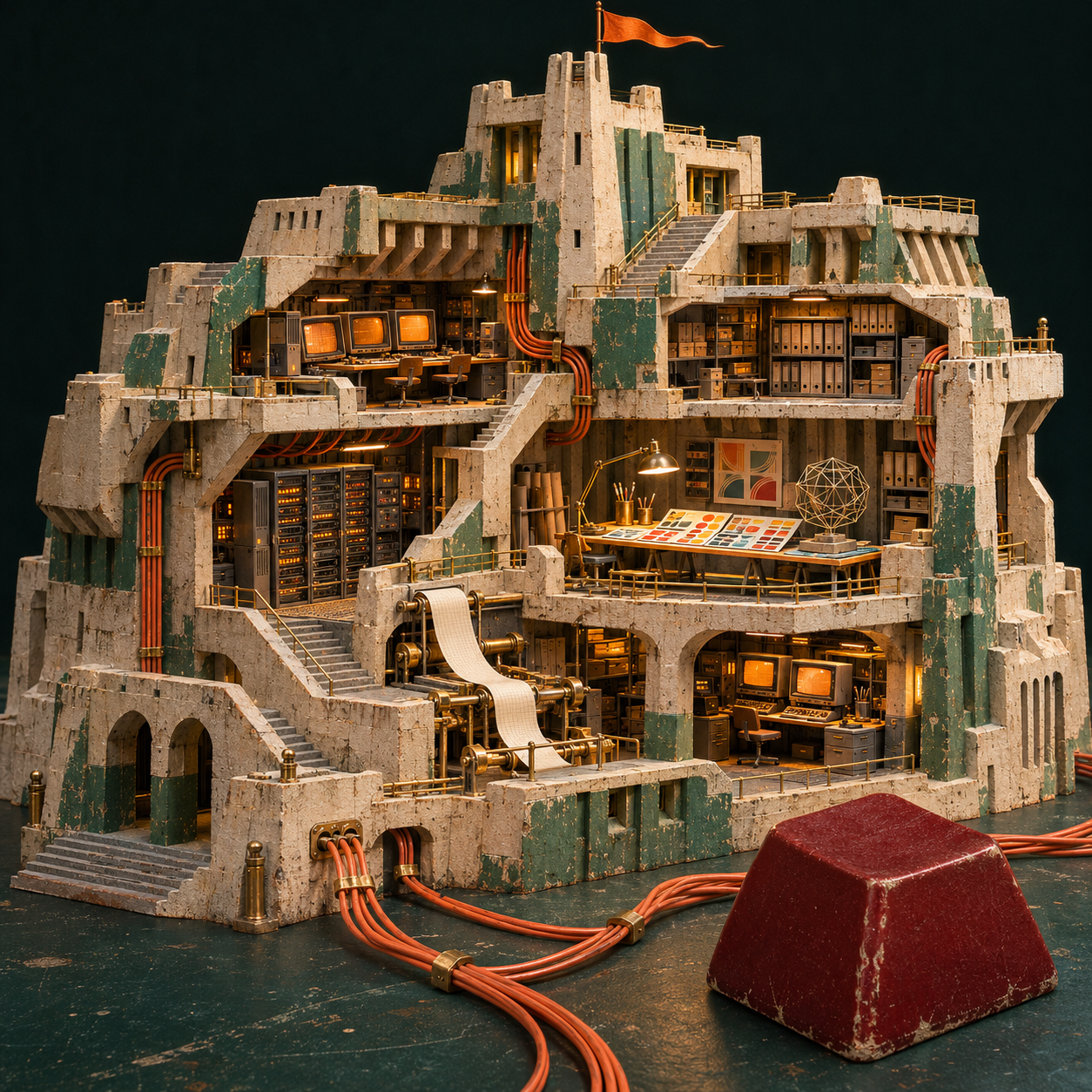
image.png exec_commandls -lh /tmp/citadel-art /opt/cfg/generated_images/01a1ec0f-c762-77d3-86c6-0c52cb4d7d8e/*
command
ls -lh /tmp/citadel-art /opt/cfg/generated_images/01a1ec0f-c762-77d3-86c6-0c52cb4d7d8e/*
command -v gcc
command -v sox
command -v fluidsynth
ffmpeg -hide_banner -encoders 2>/dev/null | rg '264|aac'
nproc
cat /sys/fs/cgroup/cpu.max
ls /usr/share/sounds
ls -ld /mnt/data
ls -lah /opt
result, 4 lines
Script completed Wall time 0.2 seconds Output: {"chunk_id":"91e6c4","wall_time_seconds":0.000594776,"exit_code":0,"original_token_count":379,"output":"-rw------- 1 runner runner 2.9M Nov 18 00:31 /opt/cfg/generated_images/01a1ec0f-c762-77d3-86c6-0c52cb4d7d8e/exec-58b21b17-8659-4e5c-b0de-9cc9e31ab923.png\n-rw------- 1 runner runner 2.9M Nov 18 00:31 /tmp/citadel-art\n/usr/bin/gcc\n V..... libx264 libx264 H.264 / AVC / MPEG-4 AVC / MPEG-4 part 10 (codec h264)\n V..... libx264rgb libx264 H.264 / AVC / MPEG-4 AVC / MPEG-4 part 10 RGB (codec h264)\n V....D h264_nvenc NVIDIA NVENC H.264 encoder (codec h264)\n V..... h264_omx OpenMAX IL H.264 video encoder (codec h264)\n V..... h264_qsv H.264 / AVC / MPEG-4 AVC / MPEG-4 part 10 (Intel Quick Sync Video acceleration) (codec h264)\n V..... h264_v4l2m2m V4L2 mem2mem H.264 encoder wrapper (codec h264)\n V....D h264_vaapi H.264/AVC (VAAPI) (codec h264)\n V..... nvenc NVIDIA NVENC H.264 encoder (codec h264)\n V..... nvenc_h264 NVIDIA NVENC H.264 encoder (codec h264)\n A..... aac AAC (Advanced Audio Coding)\n10\ncat: /sys/fs/cgroup/cpu.max: No such file or directory\nls: cannot access '/usr/share/sounds': No such file or directory\nls: cannot access '/mnt/data': No such file or directory\ntotal 12K\ndrwxr-xr-x 6 runner runner 120 Nov 18 00:30 .\ndrwxr-xr-x 10 runner runner 280 Nov 18 00:30 ..\ndrwx------ 8 runner runner 4.0K Nov 18 00:31 cfg\ndrwx------ 4 runner runner 4.0K Nov 14 06:23 codex\ndrwx------ 12 runner runner 240 Nov 18 00:30 ms-playwright\ndrwx------ 4 runner runner 4.0K Nov 11 07:55 node\n"}exec_commandmkdir -p /tmp/citadel-studio citadel
command
mkdir -p /tmp/citadel-studio citadel python3 - <<'PY' from PIL import Image im=Image.open('/tmp/citadel-art'); print(im.size) im.save('/tmp/citadel-studio/studio.jpg', quality=94) PY ls /opt/ms-playwrightresult, 4 lines
Script completed Wall time 0.2 seconds Output: {"chunk_id":"4677a9","wall_time_seconds":0.018805264,"exit_code":0,"original_token_count":48,"output":"(1254, 1254)\nchromium-1200\nchromium-1208\nchromium-1248\nchromium_headless_shell-1200\nchromium_headless_shell-1208\nchromium_headless_shell-1248\nffmpeg-1011\nffmpeg-1013\nfirefox-1555\nwebkit-2370\n"}exec_commandcat > /tmp/citadel-studio/film.py <<'PY'
command
cat > /tmp/citadel-studio/film.py <<'PY' from PIL import Image, ImageDraw, ImageFont import math, random, sys, subprocess, bisect from functools import lru_cache from pathlib import Path P=Path('/tmp/citadel-studio') OUT=Path('~/run/citadel') W,H=864,1080 FPS=24 stops=[0,4,8.75,13,17.75,22,26.75,33.5,39] art=Image.open(P/'studio.jpg').convert('RGB') ink='#12221e'; paper='#eee9d9'; muted='#abae99'; mint='#c9dac1'; orange='#fc7943'; warm='#f8f3e7' families={'serif':'/usr/share/fonts/opentype/urw-base35/P052-Roman.otf','italic':'/usr/share/fonts/opentype/urw-base35/P052-Italic.otf','mono':'/usr/share/fonts/truetype/ubuntu/UbuntuMono-R.ttf','boldmono':'/usr/share/fonts/truetype/ubuntu/UbuntuMono-B.ttf','sans':'/usr/share/fonts/opentype/urw-base35/NimbusSans-Regular.otf','bold':'/usr/share/fonts/opentype/urw-base35/NimbusSans-Bold.otf'} @lru_cache(None) def font(f,s):return ImageFont.truetype(families[f],s) def label(d,xy,t,f,s,c,anchor='lt'): d.text(xy,t,font=font(f,s),fill=c,anchor=anchor,stroke_width=0) def rule(d,y,c,x=42,xx=822):d.line((x,y,xx,y),fill=c,width=2) def sigil(d,x,y,s,c): for i,h in enumerate([.68,.91,.56,1,.74]): l=x+i*s*.216;d.rectangle((l,y+s*(1-h),l+s*.125,y+s),fill=c) def header(d,right='A MODEL FIELD GUIDE'): d.rectangle((0,0,W,64),fill=ink);sigil(d,40,19,24,orange) label(d,(79,23),'SEVERIAN / CITADEL','boldmono',23,warm) label(d,(W-40,23),right,'mono',22,'#cfceba','rt') def footer(d,t,ix): d.rectangle((0,1024,W,H),fill=ink) label(d,(42,1045),'CITADEL.SEVERIAN.DEV/PROJECTS','mono',20,'#dbcdb7') for j in range(8): x=656+21*j;d.rectangle((x,1049,x+14,1053),fill=orange if j==ix else '#526057') def clip(v):return min(1,max(0,v)) def ease(v): u=clip(v);return u*u*(3-2*u) def mix(a,b,v):return a+(b-a)*v def photo(im,y0,y1,cx,cy,span): height=span*(y1-y0)/W left=min(max(0,cx-span/2),1254-span);top=min(max(0,cy-height/2),1254-height) part=art.transform((W,y1-y0),Image.Transform.EXTENT,(left,top,left+span,top+height),Image.Resampling.BICUBIC) im.paste(part,(0,y0)) return lambda x,y:((x-left)*W/span,y0+(y-top)*W/span) def tag(d,point,xy,txt): x,y=map(int,point); tx,ty=xy;ww=round(d.textlength(txt,font=font('boldmono',19)))+22 d.line((x,y,x+20,y-20,tx+ww//2,y-20,tx+ww//2,ty+23),fill=warm,width=2) d.ellipse((x-5,y-5,x+5,y+5),fill=orange,outline=ink,width=1) d.rectangle((tx,ty,tx+ww,ty+29),fill=ink) label(d,(tx+11,ty+6),txt,'boldmono',19,warm) def railcredit(d,k,last='PERSONAL MACHINES'): label(d,(43,653),k,'boldmono',23,ink);label(d,(821,653),last,'mono',21,ink,'rt') def open_scene(im,d,u): photo(im,138,1002,627,625,1254-60*(1-ease(u/3))) d.rectangle((0,62,864,164),fill=ink) label(d,(39,76),'Citadel','serif',111,warm) label(d,(820,109),'A STUDIO IN\nCROSS SECTION','mono',23,mint,'rt') d.rectangle((0,875,W,1025),fill=paper) label(d,(42,896),'I run a whole studio on my own machines.','serif',39,ink) label(d,(43,955),'One project per session. One shared to-do ledger.','sans',29,ink) header(d);footer(d,u,0) stations=[ ('THE CONTROL ROOM','Opus 5.5','Leads the sessions and builds sites, tools\nand server kits. Each project gets its own session.',390,420,820,440,389,'PROJECT SESSIONS','CLAUDE CODE'), ('THE TEST BENCH','Sonnet 5.5','Rebases branches, runs tests and writes\nthe conversations I use to test the models.',495,782,670,535,740,'TEST RUNS','CLAUDE CODE'), ('THE DRAWING OFFICE','Fable 5.2','Helped turn a decal pack into a design language.\nCritiques designs and experiments with 3D.',867,588,670,955,570,'3D STUDY','DESIGN'), ('THE PROOFING DESK','GPT-6.2-Astra','Critiques every design. Also writes and labels\nthe data I use for testing.',931,817,648,926,799,'DESIGN CRITIQUE','CODEX'), ('THE INSPECTION BAY','GPT-6.2-Sol','Checks the claims in my code and deployment\nkits against what they actually do.',371,596,630,351,578,'DEPLOYMENT KITS','CODEX') ] def glyph(d,cx,cy,kind,t,c,ac): if kind==0: for i in range(3): yy=cy-20+i*20 d.line((cx-40,cy,cx-22,cy,cx-8,yy,cx+32,yy),fill=c,width=2) d.rectangle((cx+31,yy-4,cx+39,yy+4),fill=ac if i==int(t*1.8)%3 else c) elif kind==1: for i in range(11): x=cx-44+i*8;v=(t*13-i)%11;h=7+14*math.exp(-v*.48) d.line((x,cy-h,x,cy+h),fill=c if v>3 else ac,width=4) elif kind==2: pts=[] for z in (-1,1): for x,y in [(-1,-1),(1,-1),(1,1),(-1,1)]: a=t*.58;xx=x*math.cos(a)-z*math.sin(a);zz=x*math.sin(a)+z*math.cos(a) pts.append((cx+18*xx,cy+15*y-zz*7)) for a,b in [(0,1),(1,2),(2,3),(3,0),(4,5),(5,6),(6,7),(7,4),(0,4),(1,5),(2,6),(3,7)]:d.line((pts[a],pts[b]),fill=ac if a==4 else c,width=2) elif kind==3: for i in range(3): x=cx-39+i*28; yy=cy-12+i%2*7 d.rectangle((x,yy,x+20,yy+18),outline=c,width=2) xx=cx-39+int(t*1.25)%3*28; d.line((xx,cy+19,xx+21,cy+19),fill=ac,width=4) else: for i in range(3): yy=cy-17+i*17 d.line((cx-38,yy,cx+12,yy),fill=c,width=3) if t*2>i:d.line((cx+21,yy,cx+26,yy+5,cx+37,yy-6),fill=ac,width=3) def station(im,d,i,u,dur): k,title,body,cx,cy,span,px,py,call,platform=stations[i-1] # A lens move and a short rack-in on each cut. travel=ease(u/dur) pointer=photo(im,64,624,cx+mix(-17,19,travel),cy+mix(9,-7,travel),span*(1.08-.12*travel+.13*(1-ease(u/.55)))) tag(d,pointer(px,py),(44,100),call) dark=i%2==0 bg=ink if dark else paper fg=warm if dark else ink ac=orange if dark else '#a43b17' d.rectangle((0,624,W,1024),fill=bg);d.rectangle((0,624,W,630),fill=orange) label(d,(43,654),k,'boldmono',23,ac) label(d,(821,654),platform,'mono',22,fg,'rt') label(d,(38,698),title,'serif',83,fg) for j,line in enumerate(body.split('\n')):label(d,(43,809+j*43),line,'sans',34,fg) rule(d,927,'#47594e' if dark else '#b0b4a5') glyph(d,92,975,i-1,u,fg,ac) sub=['SHARED TO-DO LEDGER','REBASE / TEST / REPEAT','FORM / COLOUR / MOTION','REVIEW / WRITE / LABEL','CLAIM / EVIDENCE'][i-1] label(d,(157,965),sub,'mono',22,fg) label(d,(821,965),f'ROOM 0{i}','boldmono',22,ac,'rt') header(d,'INSIDE THE STUDIO');footer(d,u,i) cat=[' xx xx ',' xoxxxxxxxox ',' xooooooooox ',' xoooXoooXooox ',' xooooooooooox ',' xxooooxxxox ',' xxxxxooooooooox ',' xxoooooooooooox ',' xoooooooooooooox ',' xoooxxxxxxxxooox ',' xooox xooox '] def pet(d,cx,cy,t): step=int(t*7)%4 xx=cx-78+int(9*math.sin(t*1.7));yy=cy-45+(step%2)*3 for j,row in enumerate(cat): for k,ch in enumerate(row): if ch==' ':continue x=xx+k*7+(1 if k<8 else -1)*(step-1)*2*(j>8);y=yy+j*7 d.rectangle((x,y,x+6,y+6),fill={'x':ink,'o':orange,'X':ink}[ch]) d.line((xx+9,yy+58,xx-2,yy+49,xx-6,yy+33+step*2),fill=ink,width=6) def flower(d,cx,cy,t): for k in range(8): th=math.tau*k/8+t*.25 points=[] for j in range(46): a=j*math.tau/46 r=28+24*math.cos(a); w=14*math.sin(a) points.append((cx+math.cos(th)*r-math.sin(th)*w,cy+math.sin(th)*r+math.cos(th)*w)) d.polygon(points,fill=orange,outline=ink,width=2) d.ellipse((cx-11,cy-11,cx+11,cy+11),fill=ink) def gate(d,cx,cy,t): for i in range(3): y=cy+(i-1)*26 d.line((cx-59,cy,cx-24,cy,cx+8,y,cx+56,y),fill=ink,width=2) p=(t*.75+i/3)%1; x=cx-59+p*115; yy=cy+(i-1)*26*clip((p-.30)/.28) d.ellipse((x-5,yy-5,x+5,yy+5),fill='#a43b17') d.rectangle((cx-10,cy-11,cx+10,cy+11),fill=ink) def output_scene(im,d,u): d.rectangle((0,64,W,1024),fill=paper) label(d,(40,99),'What leaves','serif',78,ink) label(d,(38,180),'the building?','italic',84,ink) rows=[('01','Desktop Buddies','An open-source desktop pet maker.',pet),('02','Avalon','Sites for a creative community.',flower),('03','Claviger','A 421M-parameter model that triages','special')] for j,(n,title,body,fn) in enumerate(rows): y=305+j*224 rule(d,y,'#9caa98') d.rectangle((42,y+27,208,y+188),fill=mint) if fn=='special':gate(d,125,y+106,u) else:fn(d,125,y+106,u) label(d,(241,y+29),'PUBLIC WORK / '+n,'boldmono',20,'#91401f') label(d,(239,y+64),title,'serif',48,ink) label(d,(241,y+128),body,'sans',29,ink) if j==2:label(d,(241,y+162),'Discord messages for agents.','sans',29,ink) header(d,'SELECTED PROJECTS');footer(d,u,6) def end_scene(im,d,u): z=ease(u/5.5) p=photo(im,64,657,928+50*z,990+48*z,812-129*z) tag(d,p(1004,1013),(45,110),'MANUAL RELEASE') d.rectangle((0,657,W,1024),fill=ink) label(d,(42,686),'THE LAST STEP / SEVERIAN','boldmono',23,orange) label(d,(39,732),'I keep the key.','serif',85,warm) label(d,(44,854),'I review the work in private. Every deploy','sans',36,warm) label(d,(44,900),'and every public post needs my approval.','sans',36,warm) rule(d,990,'#526057') header(d,'RELEASE CONTROL');footer(d,u,7) def frame(t): ix=min(7,bisect.bisect_right(stops,t)-1) u=t-stops[ix]; dur=stops[ix+1]-stops[ix] im=Image.new('RGB',(W,H),ink);d=ImageDraw.Draw(im) if ix==0:open_scene(im,d,u) elif ix<=5:station(im,d,ix,u,dur) elif ix==6:output_scene(im,d,u) else:end_scene(im,d,u) return im if __name__=='__main__': if 'proof' in sys.argv: im=Image.new('RGB',(4*324,2*405)) for j,t in enumerate(stops[:-1]):im.paste(frame(t+1).resize((324,405),Image.Resampling.LANCZOS),((j%4)*324,(j//4)*405)) im.save(P/'proof.jpg');sys.exit() cmd=['ffmpeg','-y','-hide_banner','-loglevel','error','-f','rawvideo','-pixel_format','rgb24','-video_size',f'{W}x{H}','-framerate',str(FPS),'-i','-','-i',str(P/'score.wav'),'-c:v','libx264','-preset','fast','-crf','18','-pix_fmt','yuv420p','-colorspace','bt709','-color_primaries','bt709','-color_trc','bt709','-vf','scale=out_color_matrix=bt709','-threads','4','-c:a','aac','-b:a','160k','-movflags','+faststart','-metadata','title=Citadel — A studio in cross section','-shortest',str(OUT/'citadel.mp4')] proc=subprocess.Popen(cmd,stdin=subprocess.PIPE) for n in range(round(stops[-1]*FPS)):proc.stdin.write(frame(n/FPS).tobytes()) proc.stdin.close();sys.exit(proc.wait()) PY python3 /tmp/citadel-studio/film.py proofresult, 4 lines
Script completed Wall time 0.2 seconds Output: {"chunk_id":"b78343","wall_time_seconds":0.050017242,"exit_code":1,"original_token_count":203,"output":"Traceback (most recent call last):\n File \"/tmp/citadel-studio/film.py\", line 178, in <module>\n for j,t in enumerate(stops[:-1]):im.paste(frame(t+1).resize((324,405),Image.Resampling.LANCZOS),((j%4)*324,(j//4)*405))\n File \"/tmp/citadel-studio/film.py\", line 170, in frame\n if ix==0:open_scene(im,d,u)\n File \"/tmp/citadel-studio/film.py\", line 49, in open_scene\n photo(im,138,1002,627,625,1254-60*(1-ease(u/3)))\n File \"/tmp/citadel-studio/film.py\", line 37, in photo\n part=art.transform((W,y1-y0),Image.Transform.EXTENT,(left,top,left+span,top+height),Image.Resampling.BICUBIC)\n File \"/usr/lib/python3/dist-packages/PIL/Image.py\", line 65, in __getattr__\n raise AttributeError(f\"module '{__name__}' has no attribute '{name}'\")\nAttributeError: module 'PIL.Image' has no attribute 'Transform'\n"}exec_commandsed -i 's/Image.Transform.EXTENT/Image.EXTENT/g; s/Image.Resampling.BICUBIC/Image.BICUBIC/g; s/Image.Resampling.LANCZOS/Image.LANCZOS/g; s/d.polygon(points,fill=orange,outline=ink,width=2)/d.polygon(points,fill=orange,outline=ink)/' /tmp/citadel-studio/film.py
command
sed -i 's/Image.Transform.EXTENT/Image.EXTENT/g; s/Image.Resampling.BICUBIC/Image.BICUBIC/g; s/Image.Resampling.LANCZOS/Image.LANCZOS/g; s/d.polygon(points,fill=orange,outline=ink,width=2)/d.polygon(points,fill=orange,outline=ink)/' /tmp/citadel-studio/film.py
python3 /tmp/citadel-studio/film.py proof
result, 4 lines
Script completed Wall time 0.2 seconds Output: {"chunk_id":"222c4d","wall_time_seconds":0.058411461,"exit_code":1,"original_token_count":216,"output":"Traceback (most recent call last):\n File \"/tmp/citadel-studio/film.py\", line 178, in <module>\n for j,t in enumerate(stops[:-1]):im.paste(frame(t+1).resize((324,405),Image.LANCZOS),((j%4)*324,(j//4)*405))\n File \"/tmp/citadel-studio/film.py\", line 170, in frame\n if ix==0:open_scene(im,d,u)\n File \"/tmp/citadel-studio/film.py\", line 52, in open_scene\n label(d,(820,109),'A STUDIO IN\\nCROSS SECTION','mono',23,mint,'rt')\n File \"/tmp/citadel-studio/film.py\", line 16, in label\n d.text(xy,t,font=font(f,s),fill=c,anchor=anchor,stroke_width=0)\n File \"/usr/lib/python3/dist-packages/PIL/ImageDraw.py\", line 394, in text\n return self.multiline_text(\n File \"/usr/lib/python3/dist-packages/PIL/ImageDraw.py\", line 509, in multiline_text\n raise ValueError(\"anchor not supported for multiline text\")\nValueError: anchor not supported for multiline text\n"}exec_commandsed -i "s/'A STUDIO IN\\\\nCROSS SECTION'/'A STUDIO IN CROSS SECTION'/" /tmp/citadel-studio/film.py
command
sed -i "s/'A STUDIO IN\\\\nCROSS SECTION'/'A STUDIO IN CROSS SECTION'/" /tmp/citadel-studio/film.py
python3 /tmp/citadel-studio/film.py proof
result, 4 lines
Script completed Wall time 0.6 seconds Output: {"chunk_id":"7e0f4e","wall_time_seconds":0.388772713,"exit_code":0,"original_token_count":0,"output":""}view_image/tmp/citadel-studio/proof.jpg
input
image((await tools.view_image({path:'/tmp/citadel-studio/proof.jpg'})).image_url)result, 4 lines
Script completed
Wall time 0.0 seconds
Output:
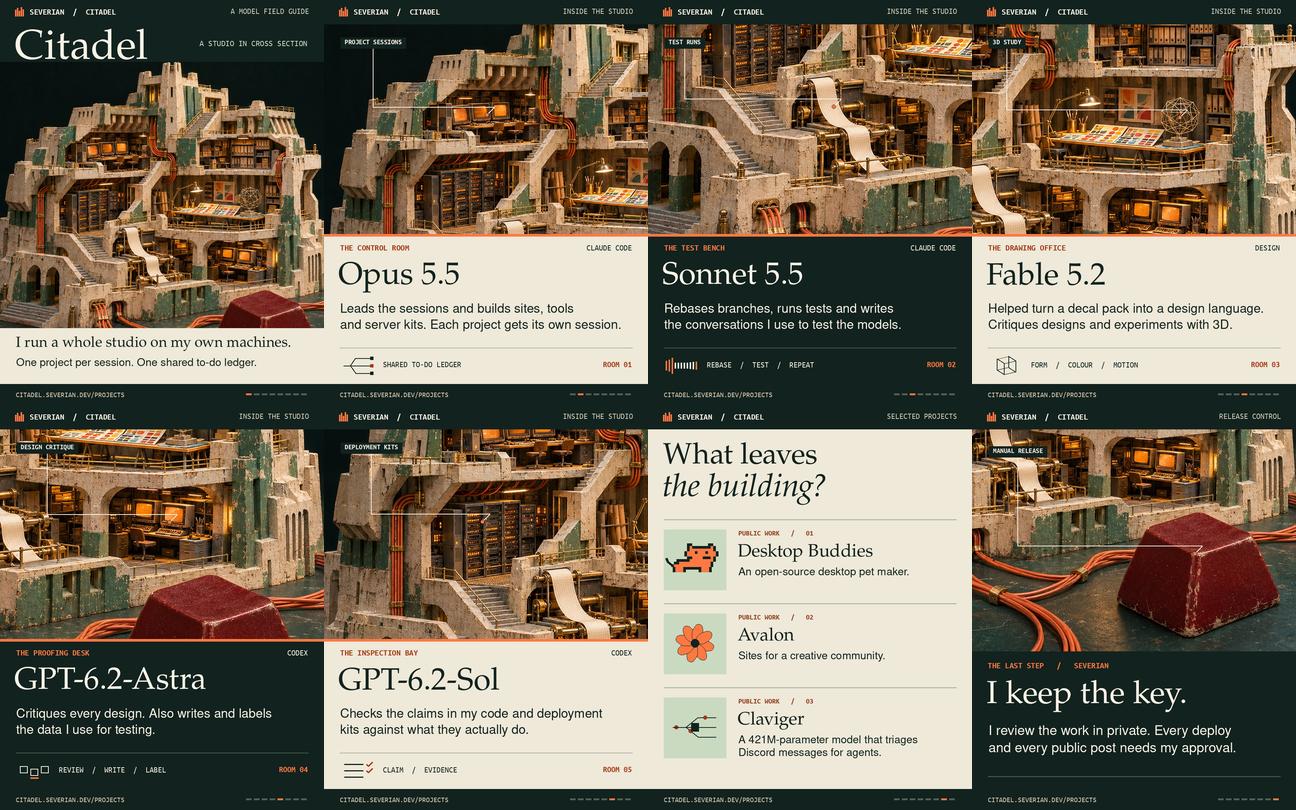
image.jpg